

MacaifyChatGPT on Mac AI Tool
Enhanced Mac productivity through automation.
ChatGPT on MacFree + from $8/mo0
Enhanced Mac productivity through automation.
Overall
Average of 2 data signals below
Basic pricing published
3 of 4 content areas filled (features, FAQs, pros/cons, description)
This score is calculated automatically from this listing's available data (community rating, capabilities, pricing transparency, and documentation). It is not a paid or sponsored review.
Pricing & Model
freemium
Free + from $8/mo
Open Source & API
Proprietary
No Public API
Foundational Model
Proprietary Engine
Key Integrations
Web App Only
Free + from $8/mo
See full pricing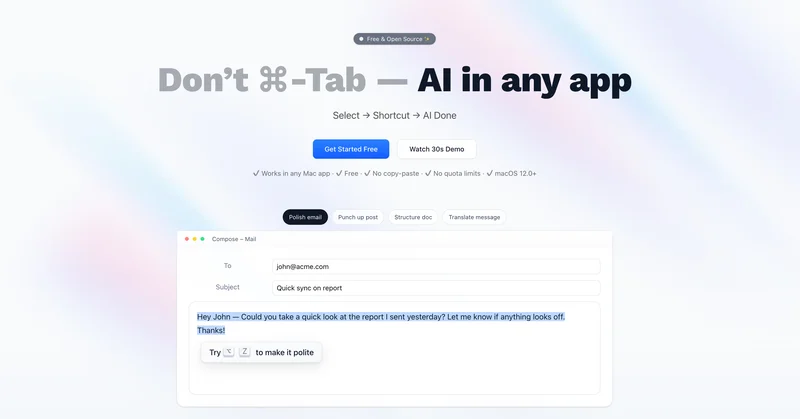
Common queries about Macaify answered
Macaify is an application that brings the power of the AI language model, ChatGPT, to Mac users. It integrates AI capabilities into any Mac app with a simple keyboard shortcut key, enabling automation of tasks such as text processing and code generation. Macaify also has an extensive selection of predefined AI robots available for customization to handle different workflow steps.
To use Macaify on your Mac, you need to install the application. After installation, you can employ AI capabilities in any app by selecting the text and pressing the shortcut key. Macaify will then automatically handle the task, eliminating the need to switch between apps.
Real ratings and feedback from the community
Be the first to share your rating and comments for this AI tool!
How Macaify stacks up against top competitors
| Feature | Macaify | BoltAI | Olle | Beam |
|---|---|---|---|---|
| Rating | ★ 3 | — | ★ 3 | ★ 3 |
| Pricing Model | freemium | paid | paid | paid |
| API Access | No | No | No | No |
| Open Source | No | No | No | No |
| Link | Visit Website | Visit Website |
Explore similar AI tools in this category
The main feature of Macaify is its ability to integrate AI capabilities into any Mac application. It does this by letting users highlight text and press the shortcut key, instantly completing the task with the power of AI, without any need to switch between apps.
Macaify integrates with Mac apps via a simple shortcut key. After selecting text within an application, users press the shortcut key and Macaify instantly performs the respective task. This integration removes the need to swap between applications, enhancing productivity.
Unfortunately, the specific shortcut key used in Macaify is not disclosed in their information. However, it is stated that by holding down the command key, users can see shortcut key prompts.
Beyond text-based activities, Macaify is developing features to unlock a world of limitless AI capabilities. Some of these include generating images, semantically searching images, converting text to speech files, processing web URLs, and searching the latest internet content.
Macaify's keyboard-centric operation works by prioritizing shortcut keys for efficiency, thus offering a mouse-free experience. Users can hold down the command key to display shortcut key prompts, facilitating swift navigation and use of the tool.
While Macaify promotes its mouse-free, keyboard-centric operation, it does not explicitly state that mouse use is not supported. The primary focus is on enhancing efficiency through keyboard shortcuts.
Macaify offers different pricing plans suitable for a variety of users. The Free plan includes basic functions and a limited monthly quota. The Standard and Plus plans, expected to be released soon, offer additional AI capabilities and higher monthly quotas with the Plus plan also providing expert team support.
With Macaify's Free plan, you can unlock most of the basic functions, use unlimited bots, access 1000+ pre-defined bots, integrate AI seamlessly in any scenario, and use your own API key. There's also a monthly free quota of 50.
The Standard plan, besides all Free plan features, adds capabilities like AI-powered image creation and search, voice AI, AI-powered charting creation, and increases the monthly free quota to 1000. The Plus plan extends this further with expert team support and a monthly free quota of 3000.
Yes, Macaify supports the processing of web URLs, although it appears this feature is currently in development.
Macaify supports AI robot workflows for text processing, code generation, and automation tasks. However, specific examples of these workflows aren't delineated in the available information.
Macaify allows users to customize predefined AI robots. However, the exact process for customizing these robots isn't detailed in the available information.
To select text and use Macaify, highlight the text you want to process within an application and then press the shortcut key. Macaify will then handle the task for you instantly, without the need to switch apps.
Yes, Macaify will have the ability to search through the latest internet content. However, this feature appears to be currently in development.
The Plus plan of Macaify comes with expert team support. While the provided information doesn't detail the form this support takes, it suggests a higher level of technical assistance for Plus plan users.
Macaify is compatible with macOS version 12.0 and above.
With Macaify's 1000+ robot templates, users can choose a template that best fits their required task or workflow. The exact method users should follow to decide which template to use isn't specified in the available information.
The limitations vary depending on the plan you choose. The free plan has a quota of 50 per month, the Standard plan offers a quota of 1000, and the Plus plan provides a quota of 3000 per month. These quotas represent the number of tasks you can execute using the service within a given month.
| Visit Website |
| Visit Website |


