

Template PromptsPrompts AI Tool
Your personal AI prompts generator
PromptsFree + from $3.99/mo0
Your personal AI prompts generator
Overall
Average of 2 data signals below
Basic pricing published
3 of 4 content areas filled (features, FAQs, pros/cons, description)
This score is calculated automatically from this listing's available data (community rating, capabilities, pricing transparency, and documentation). It is not a paid or sponsored review.
Pricing & Model
free_trial
Free + from $3.99/mo
Open Source & API
Proprietary
No Public API
Foundational Model
Proprietary Engine
Key Integrations
Web App Only
Free + from $3.99/mo
See full pricing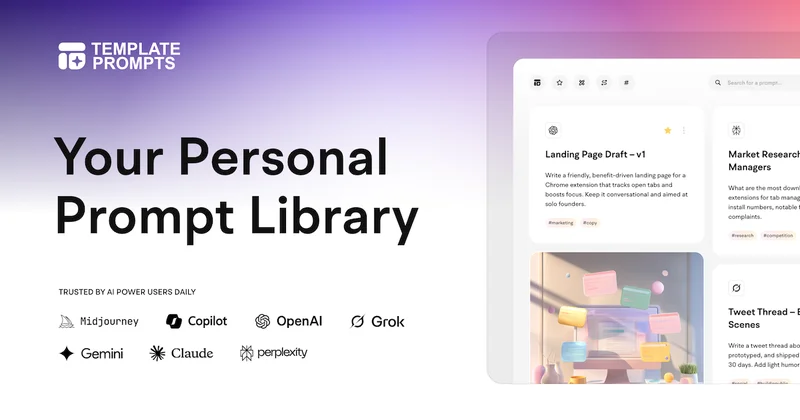
Common queries about Template Prompts answered
Template Prompts is an AI-powered tool that aids in generating, storing, and organizing AI-based prompts. It enables users to create customized machine learning prompts and store them in user-defined templates for reuse in various contexts or AI tools.
Template Prompts works by turning complex, one-off prompts into reusable templates. Users can integrate their own variables into the prompts, making them easy to modify to suit different datasets. A user can quickly copy any customized prompts into their preferred AI tool, adjusting values to suit other use cases this allows for quick and efficient integration with different applications.
Real ratings and feedback from the community
Be the first to share your rating and comments for this AI tool!
How Template Prompts stacks up against top competitors
| Feature | Template Prompts | Promptmakr | PromptBase | AI Prompt Generator |
|---|---|---|---|---|
| Rating | ★ 3 | ★ 3 | — | ★ 4.6 |
| Pricing Model | free_trial | freemium | freemium | paid |
| API Access | No | No | No | No |
| Open Source | No | No | No | No |
| Link | Visit Website | Visit Website |
Explore similar AI tools in this category
PromptBase is an AI Prompt Marketplace populated by over hundreds of thousands of expertly crafted prompt templates. This platform brings together AI tools namely, Midjourney, ChatGPT, Sora, FLUX, and
Template Prompts enhances productivity by providing a private library where users can store all their prompts. It lets them organize prompts by tools and tags, making retrieval and use more efficient. It also allows prompt replication and customization, saving users from creating new prompts from scratch each time they need one.
Yes, Template Prompts supports the integration of user-defined variables, enabling easy customization and modification of prompts to suit different data.
You can integrate Template Prompts with your preferred AI tool by copying any customized prompt into your tool's interface using a single click. You can adjust values as per your requirements and reuse the prompt for various use cases.
Template Prompts can handle a variety of prompts, facilitating the creation of specialized AI tools for a variety of uses, such as copywriting assistants. The prompts can be complex, requiring the use of variables, or straightforward, and can be saved and organized for easy retrieval and use.
Yes, you can store all your varied prompts in one place with Template Prompts. It has a private library that offers storage for all of your prompts, making them easily accessible and well-organized.
Yes, Template Prompts can assist in prompt organization by letting you sort prompts by tools and tags. This ensures easy filtering and identification of your stored prompts.
The prompts library in Template Prompts is highly private. Each user has a single unified private library where they can store all their prompts securely and access them easily whenever necessary.
Yes, you can customize the stored prompts in Template Prompts. The platform allows you to modify your prompts and integrate user-defined variables to adjust them according to the requirements of different datasets.
Yes, Template Prompts facilitates the replication of complex prompts. It allows users to turn these complex, one-off prompts into templates by using user-defined variables. These templates can then be repeatedly reused with different data.
Yes, stored prompts can be modified in Template Prompts to suit different data. The platform allows users to change the values of the variables used in prompts, thus modifying them for various data contexts.
With Template Prompts, users can create a wide array of specialized AI tools. The flexibility of the platform in customizing prompts makes it particularly beneficial for the creation of tools such as copywriting assistants.
You can easily sort your Template Prompts library by tools and tags. This feature allows you to categorize your prompts according to the tool you'd like to use them with or by custom tags, ensuring they can be easily found and accessed when needed.
Template Prompts ensures easy retrieval and reproduction of prompts through its library, which keeps all prompts organized and accessible. The prompts are stored separately, encapsulated in templates for simple retrieval and reuse.
Yes, with Template Prompts, you can showcase your favorite prompts. The platform has a 'Favorites' section where you can add the prompts you prefer and access them with a single click.
Template Prompts facilitates the creation of specialized AI tools by transforming complex one-off prompts into reusable templates. The templates can then be customized with user-defined variables according to different data contexts, making the creation of AI tools such as copywriting assistants much simpler.
To copy your prompts into a different AI tool using Template Prompts, you just need to select the template you want to use and with one click, the prompt will get copied. After copying, you can adjust the values of the variables in the prompt to suit your use case in the AI tool.
Variable integration in Template Prompts involves incorporating user-defined variables into your prompts. These variables can easily be changed for different data sets, which makes the same prompt reusable for various contexts.
Template Prompts provides email support as part of its services. Users on paid plans can also take advantage of the 14-day free trial to explore the full range of features and benefits of the Template Prompts platform.
| Visit Website |
| Visit Website |


