

MD EditorMarkdown editor AI Tool
AI-powered markdown editor for tech writers
Markdown editorFree
AI-powered markdown editor for tech writers
Overall
Average of 2 data signals below
Basic pricing published
3 of 4 content areas filled (features, FAQs, pros/cons, description)
This score is calculated automatically from this listing's available data (community rating, capabilities, pricing transparency, and documentation). It is not a paid or sponsored review.
Pricing & Model
freemium
Free
Open Source & API
Proprietary
No Public API
Foundational Model
Proprietary Engine
Key Integrations
Web App Only
Free
See full pricing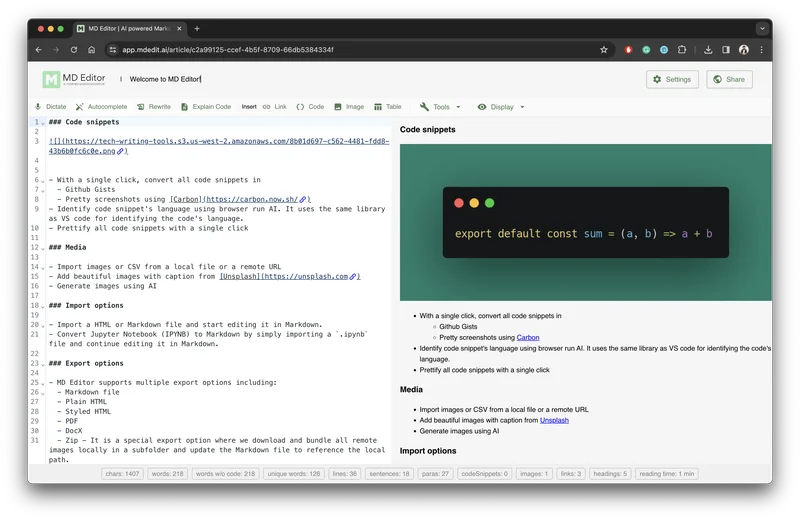
Common queries about MD Editor answered
MD Editor is an advanced markdown editor powered by AI, tailored specifically for tech writers. It assists in the creation and management of articles, drafts, and ideas through a single platform. It organizes these items into folders, tags, and provides search functionality. Besides, it utilizes the capabilities of AI to deliver intelligent suggestions, formatting help, and highlight code to simplify the writing process.
MD Editor's AI features include intelligent suggestions, formatting assistance, and code highlighting. It also offers the capability to use AI to generate the first draft of a blog post, including step-by-step articles with code snippets and explanations. It incorporates an 'Explain' feature where AI generates explanations for code snippets. Additionally, it has an AI-powered auto-detection of code snippet languages. The tool also helps to brainstorm ideas by generating new and relevant ideas based on user input.
Real ratings and feedback from the community
Be the first to share your rating and comments for this AI tool!
How MD Editor stacks up against top competitors
| Feature | MD Editor | Fliki | Lovable | Vsub |
|---|---|---|---|---|
| Rating | ★ 3 | ★ 4.8 | — | ★ 4.5 |
| Visits / month | — | 692,189 | 34,814,456 | 107,765 |
| Pricing Model | freemium | freemium | freemium | freemium |
| API Access | No | No | No | No |
| Open Source | No | No | No | No |
| Link | Visit Website |
Explore similar AI tools in this category

MD Editor uses AI to assist with formatting and code highlighting, which significantly streamlines the writing process. It provides syntax highlighting and one-click indentation, which are crucial for code clarity. The AI-powered code language detection function recognizes the coding language being used in the code snippet and adjusts the syntax highlighting accordingly.
MD Editor has a feature to generate the first draft of a blog post using AI. This feature encompasses generating step-by-step articles complete with code snippets and explanations. Based on an article's title and writing style, the AI function can create a draft, leaving the tech writer to refine and finalize the draft.
Brainstorming is powered by the AI functionality within MD Editor. The tool can generate new and relevant ideas based on user input, which aids in overcoming creative blocks. This allows users to generate, organize, and refine ideas seamlessly within the editor enhancing the creative process.
The 'Explain' feature in MD Editor uses AI to automatically generate concise explanations for code snippets. By selecting a code snippet and clicking the 'Explain' button, the AI handles the rest, instantly providing explanations to the code snippet, thereby easing understanding for the readers.
MD Editor uses an AI-powered feature to automatically detect the language of a code snippet. Once a snippet is pasted or written within the editor, the AI utility recognises the syntax of the coding language used, effectively distinguishing between different languages.
Converting code snippets into screenshots in MD Editor can be done with a single click. There is a built-in feature that turns these snippets into visually appealing screenshots, or Github Gists if the user requires, thereby enhancing the readability and presentation of the code.
Tech writers using MD Editor can expect a boosted productivity and improved article quality due to its intelligent features tailored specifically for tech writing. These help to streamline the writing process. It offers creative brainstorming capabilities, syntax highlighting, code explanation, code language detection, and seamless import and export functionalities to provide an all-round beneficial platform for tech writers.
MD Editor offers various media tools such as the ability to add images and voice dictation. Users can include photos from local files or the web, add images directly from Unsplash, or generate images from text prompts using AI. Voice dictation allows content to be transcribed with the in-built speech recognition. Images can be hosted on MD Editor servers or integrated with Imgur.
MD Editor supports both importing and exporting of various files to facilitate content creation and distribution. Users can import existing content from IPYNB, HTML, and MD files. On the export end, the platform supports a range of formats including MD, styled HTML, PDF, Github Gist, and DocX. Direct publishing to platforms like Medium, Github, and Dev.to is also supported.
MD Editor, with its range of intelligent features, streamlines the technical writing experience. It offers AI-powered intelligent suggestions, formatting assistance, and code highlighting. It eases the creation process with features to generate a first blog post draft and brainstorming ideas. It also assists in organizing your work by managing articles, drafts, and ideas in one place. Moreover, it enhances code snippets understanding through 'Explain' feature and one-click conversion of snippets into screenshots or Github Gists.
MD Editor supports the import of IPYNB, HTML, and MD files. For exporting, it supports a variety of formats such as MD, styled HTML, PDF, Github Gist, and DocX. Furthermore, it supports direct publishing to platforms like Medium, Github, and Dev.to, providing a broad range to accommodate most tech writer's needs.
MD Editor provides an article management feature where articles, drafts, and ideas can be managed in one place. It allows these items to be organized into folders, added tags, and keywords. This makes it easier for users to sort through their content. Moreover, the AI functionality works to aid users in generating ideas, ensuring they never lose track of their creative thoughts.
You can add code blocks and highlights in MD Editor using its powerful markdown editor feature. This editor supports syntax highlighting, code blocks for an enhanced coding experience. You can add code snippets directly into your articles, after which MD Editor automatically draws up syntax highlighting based on the identified code language.
MD Editor allows you to integrate your Medium or Dev.to blog by using your own API keys. The BYOK (Bring Your Own Keys) feature of MD Editor enables you to connect to your OpenAI account and publish directly to your Medium or Dev.to blog.
AI in MD Editor has the capability to generate the first draft of an article based on the article title and writing style. After inputting the title and selecting a writing style, the AI feature generates a corresponding draft. The draft can then be edited and refined by the user.
In MD Editor, you can customize your writing experience with various themes, fonts, and editor settings. This allows you to set up the editor to your preferred visual aesthetics and functional settings, thereby improving your overall writing experience.
The 'Article Metrics' feature in MD Editor provides useful statistics about your articles like word count, reading time, readability scores, and more. This analytic insight helps you to understand the depth and readability of your writing, assisting in making your articles more user-friendly.
MD Editor is developing a sharing feature that will allow you to share your articles with team members and collaborate on them. Although the feature is marked as 'coming soon' on their website, once live, it will further facilitate teamwork and provide an opportunity to get feedback from the community.
| Visit Website |
| Visit Website |
| Visit Website |
Lexi AI is an AI-powered research assistant that helps users read, summarize, and extract key information from various documents. It allows users to chat with their documents, ask questions, generate new content, and organize their research efficiently.
Fliki
Compare Fliki's free and paid tiers to see how this text-to-video AI tool simplifies social media, blog-to-video, and content marketing production.


