

DraGANImage controllability AI Tool
Controlling GANs through Point-based Manipulation
Image controllabilityFree
Controlling GANs through Point-based Manipulation
Overall
Average of 2 data signals below
Basic pricing published
3 of 4 content areas filled (features, FAQs, pros/cons, description)
This score is calculated automatically from this listing's available data (community rating, capabilities, pricing transparency, and documentation). It is not a paid or sponsored review.
Pricing & Model
free
Free
Open Source & API
Proprietary
No Public API
Foundational Model
Proprietary Engine
Key Integrations
Web App Only
Free
See full pricing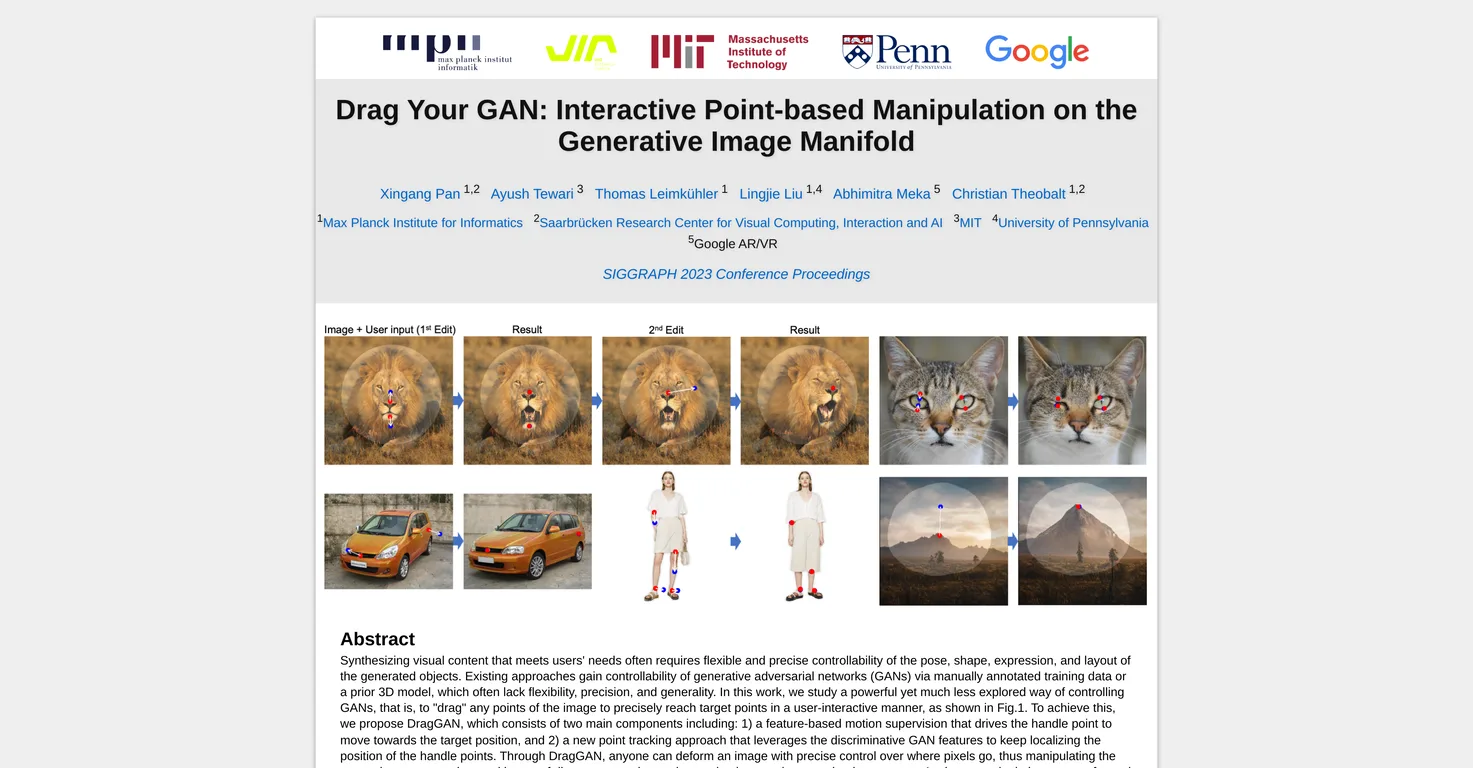
Common queries about DraGAN answered
The main purpose of Drag Your GAN is to offer flexible and precise control of the synthesis of visual content. This is achieved by allowing users to manipulate the pose, shape, expression, and layout of the generated objects through an interactive point-based manipulation on the generative image manifold.
The DragGAN component of Drag Your GAN works through two main mechanisms. It involves a feature-based motion supervision that drives the handle points towards their target positions. It also implements a new point tracking approach, which uses the discriminative Generative Adversarial Network (GAN) features to continuously localize the position of handle points.
Real ratings and feedback from the community
Be the first to share your rating and comments for this AI tool!
How DraGAN stacks up against top competitors
| Feature | DraGAN | Fliki | Lovable | Vsub |
|---|---|---|---|---|
| Rating | ★ 3 | ★ 4.8 | — | ★ 4.5 |
| Visits / month | — | 692,189 | 34,814,456 | 107,765 |
| Pricing Model | free | freemium | freemium | freemium |
| API Access | No | No | No | No |
| Open Source | No | No | No | No |
| Link | Visit Website |
Explore similar AI tools in this category

Key features of Drag Your GAN include interactive point-based manipulation on the generative image manifold, feature-based motion supervision, a novel point tracking technique leveraging GAN features, image deformation, the manipulation of diverse categories such as animals, humans, cars, and landscapes, and the ability to manipulate real images through GAN inversion.
Benefits of using Drag Your GAN for image manipulation include increased flexibility, precision, and generality. The tool allows users to perform nuanced alterations on images, including occluded content and deforming shapes, while still producing realistic outputs. Its superiority over prior approaches is demonstrated in tasks of image manipulation and point tracking.
Drag Your GAN can manipulate diverse categories such as animals, cars, humans, landscapes, among others.
What's unique about Drag Your GAN's approach to manipulating images is its use of DragGAN. This allows users to 'drag' any points in an image to reach specific target points interactively, providing impressive flexibility, precision, and generality. The tool grants users precise control over pixel movement for diverse image manipulation.
Drag Your GAN uses a novel point tracking technique that leverages the discriminative GAN features to continuously localize the position of the handle points. This facilitates exact positioning and smoother transitions during image alterations.
Yes, Drag Your GAN can manipulate real images. This is achieved through a process known as GAN inversion.
IDK
In the context of Drag Your GAN, GAN inversion is a process that enables the manipulation of real images. By inverting the image through the GAN, the tool can manipulate it much like the synthetic images it generates.
Drag Your GAN uses point-based manipulation to offer a more intuitive, flexible, and precise way of controlling GANs. This method complements the generative image manifold of a GAN and promises realistic outputs, even under challenging scenarios.
Both qualitative and quantitative comparisons demonstrate the advantage of Drag Your GAN over prior approaches in the tasks of image manipulation and point tracking. This tool offers more flexibility, precision, increased generality, and has capability to manipulate real images through GAN inversion.
Drag Your GAN performs exceptionally well in challenging scenarios, such as hallucinating occluded content and deforming shapes that consistently follow the object's rigidity. Despite these circumstances, it continues to produce realistic outputs due to its operating principle on the learned generative image manifold of a GAN.
The role of feature-based motion supervision in Drag Your GAN is to drive the handle point to move towards the target position. This constitutes an integral part of the DragGAN model, which essentially empowers users with control over where pixels go in an image.
Image deformation in Drag Your GAN refers to the capability of the tool to manipulate or distort the shape of the generated objects in the image for specific outcomes. Users can deform images with precise control, which includes changing the pose, shape, expression, and layout of diverse categories.
Drag Your GAN manipulates pixel movement through its feature-based motion supervision mechanism, which drives handle points towards target positions. Additionally, its novel point tracking approach leverages the discriminate GAN features to localize the handle points, providing comprehensive control over pixel movement.
The outputs of Drag Your GAN have a wide range of applications, including but not limited to enhancing computer graphics, virtual reality experiences, aiding in creative arts and design, and providing a platform for researchers to study the behavior of GANs under precise and controlled manipulation.
The interactive point-based manipulation on the generative image manifold in Drag Your GAN refers to a control mechanism that allows users to 'drag' points on an image to reach specific target points interactively. This method leads to flexible and precise deformations on the image, transforming the pose, shape, expression, and layout of an object.
Drag Your GAN ensures precision in image manipulation through its feature-based motion supervision that navigates handle points towards their target positions. Furthermore, a novel point tracking approach that uses discriminative GAN features keeps localizing the position of handle points, contributing to the overall precision of the tool.
IDK
| Visit Website |
| Visit Website |
| Visit Website |
Lexi AI is an AI-powered research assistant that helps users read, summarize, and extract key information from various documents. It allows users to chat with their documents, ask questions, generate new content, and organize their research efficiently.
Fliki
Compare Fliki's free and paid tiers to see how this text-to-video AI tool simplifies social media, blog-to-video, and content marketing production.


