

Decks AppLearning enhancement AI Tool
Master any subject with our specialized note-taking app.
Learning enhancementFree + from $8/mo0
Master any subject with our specialized note-taking app.
Overall
Average of 2 data signals below
Basic pricing published
3 of 4 content areas filled (features, FAQs, pros/cons, description)
This score is calculated automatically from this listing's available data (community rating, capabilities, pricing transparency, and documentation). It is not a paid or sponsored review.
Pricing & Model
free_trial
Free + from $8/mo
Open Source & API
Proprietary
No Public API
Foundational Model
Proprietary Engine
Key Integrations
Web App Only
Free + from $8/mo
See full pricing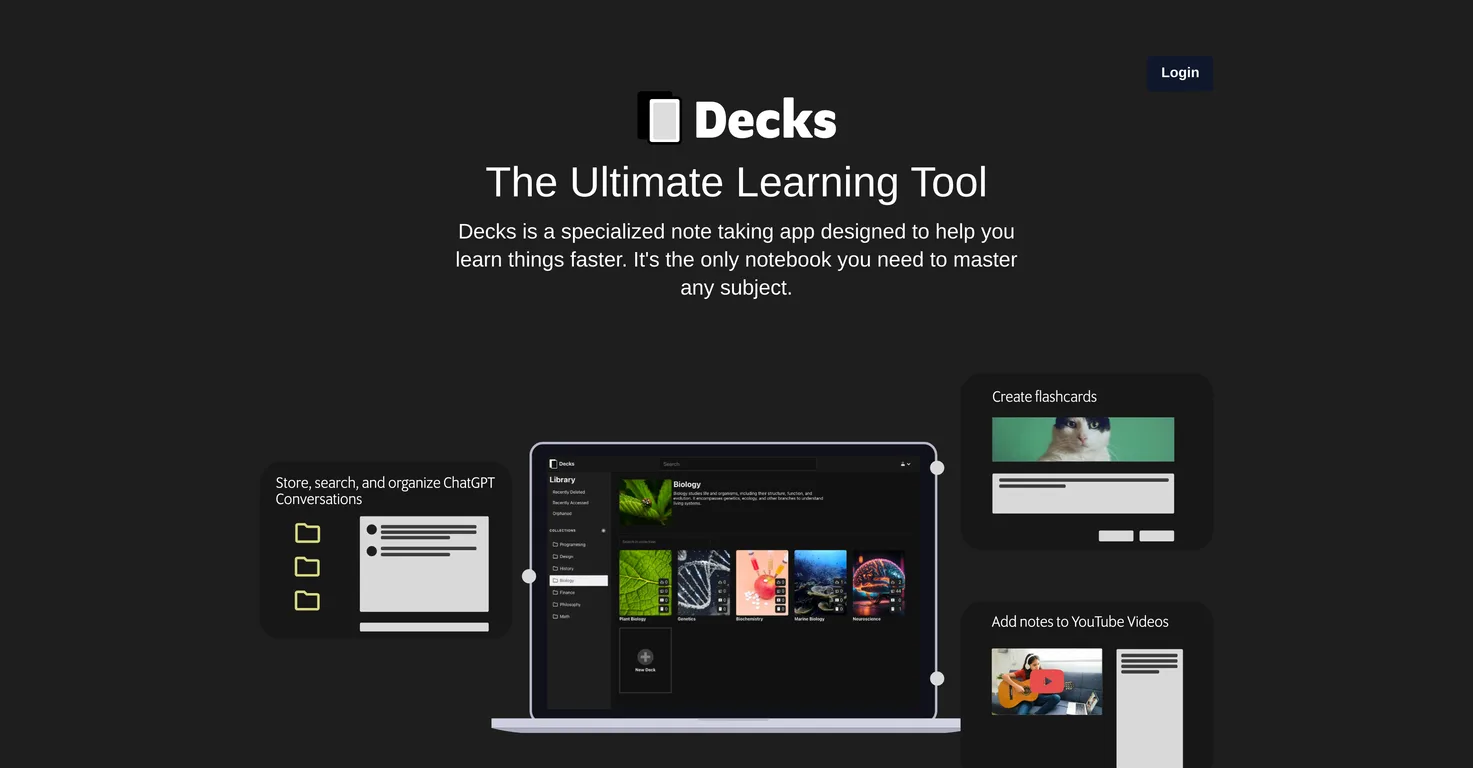
Common queries about Decks App answered
Decks is a specialized note-taking application designed to facilitate faster and effective learning. It provides an integrated framework to master any subject, offering features like attaching notes to YouTube videos, integration with ChatGPT, powerful search functionality, and flashcard creation. It also allows organization of notes through various layers such as tagging chats, grouping chats into decks, and grouping of decks by subjects.
The YouTube integration on Decks works by allowing users to attach notes directly to YouTube videos, providing easy access to organized information and enhanced engagement with the material. It offers the ability to add timestamps to videos, saving time from navigating the entire video and directly jumping to important points. Users can enter a YouTube URL directly or conveniently use the embedded search functionality in the app to find the videos they need.
Real ratings and feedback from the community
Be the first to share your rating and comments for this AI tool!
How Decks App stacks up against top competitors
| Feature | Decks App | Fliki | Lovable | Vsub |
|---|---|---|---|---|
| Rating | ★ 3 | ★ 4.8 | — | ★ 4.5 |
| Visits / month | — | 692,189 | 34,814,456 | 107,765 |
| Pricing Model | free_trial | freemium | freemium | freemium |
| API Access | No | No | No | No |
| Open Source | No | No | No | No |
| Link | Visit Website |
Explore similar AI tools in this category
The functionality of timestamps in Decks is to enable users to precisely locate important points in a YouTube video. Adding timestamps allows for quick navigation to crucial sections, saving the user the effort of scrubbing through the entire video to find necessary material.
Yes, users can search YouTube videos directly through Decks. It can be done by either entering a YouTube URL or using the embedded search functionality within the Decks application.
Yes, Decks integrates with ChatGPT. It has a user-friendly interface that facilitates easy organization and retrieval of chats. Users can use their own API Key to chat directly with ChatGPT.
The chat organization in Decks works through multiple layers of organization. Users can add tags directly to their chats, which can then be grouped into different decks, providing a structured approach to classify and retrieve information. These decks can further be grouped by different subjects for more in-depth organization.
Yes, Decks has a powerful search functionality within chats. Just by typing in a few keystrokes, users can navigate directly to a specific message between themselves and ChatGPT, eliminating the need for extensive browsing to find relevant content.
Decks offers several organizational features. It enables users to add tags to their chats, group chats into different decks, and further group the decks by different subjects. But not limited to this, users can also create flashcards decks and attach these to notes and YouTube videos to streamline study sessions and enhance memory retention.
Yes, on Decks, users can create decks of flashcards. These serve to enhance memory retention and streamline study sessions by allowing users to organize and revise essential points efficiently.
Yes, in Decks, users can attach flashcards to their notes and YouTube videos. This feature allows users to record important information that they don't want to forget while studying a particular subject or watching a YouTube video.
Yes, Decks supports visual learning by allowing users to incorporate images into their flashcards. Those users who are more visual learners can either copy and paste or drag and drop images into the flashcards, enhancing the learning process.
Decks works on a subscription model. After a 14-day free trial, users can opt for a monthly or yearly subscription to continue using the app. The monthly subscription for Decks costs $8, while the yearly one costs $79.
Yes, Decks offers a 14-day free trial for its users. After trying out the services during the trial period, users can opt to subscribe monthly or annually to continue enjoying the features of Decks.
Decks assists users in learning faster by offering an integrated framework for note-taking, integration with YouTube and ChatGPT, and a powerful search functionality. It enables users to attach notes directly to YouTube videos, quickly locate important points in the videos through timestamps, and search for messages in chats with ChatGPT effectively. Additionally, it helps to organize learning material through tags, grouping of chats into decks, and by subjects, enhancing comprehension and information retrieval.
IDK
On Decks, chats can be grouped into decks through the organizational features offered on the platform. These layers of organization help users manage their information and messages better, enhancing the convenience of recalling and reviewing learning material.
In Decks, decks can be grouped by different subjects as part of its organizational features. This enables users to categorize their notes, flashcards, and chats based on the subjects they are studying, aiding in effective studying and information retrieval.
Decks enhances memory retention through its flashcard creation feature. Users can make flashcards decks to record valuable points, and then review them at a later time to reinforce memory. The platform permits these flashcards to be attached to notes and YouTube videos for a comprehensive learning experience.
The note-taking feature in Decks works by facilitating users to attach notes directly to YouTube videos. In addition to this, users can also create flashcards and attach them to both notes and videos. This approach to note-taking allows for efficient learning, easy access to organized information, and enhanced retention of the learning material.
Decks offers features like creating flashcards, powerful search capabilities, and organization layers to streamline your study sessions. You can make and organize flashcards for effective revision, use the search function to quickly locate specific chats or notes, and organize your chats and notes into decks and by subjects to enhance efficiency during your study sessions.
| Visit Website |
| Visit Website |
| Visit Website |
Lexi AI is an AI-powered research assistant that helps users read, summarize, and extract key information from various documents. It allows users to chat with their documents, ask questions, generate new content, and organize their research efficiently.


