

Video HighlightVideo summaries AI Tool
Extracting key points for efficient video note-taking.
Video summaries0
Extracting key points for efficient video note-taking.
Overall
Average of 1 data signal below
3 of 4 content areas filled (features, FAQs, pros/cons, description)
This score is calculated automatically from this listing's available data (community rating, capabilities, pricing transparency, and documentation). It is not a paid or sponsored review.
Pricing & Model
paid
Open Source & API
Proprietary
No Public API
Foundational Model
Proprietary Engine
Key Integrations
Web App Only
Common queries about Video Highlight answered
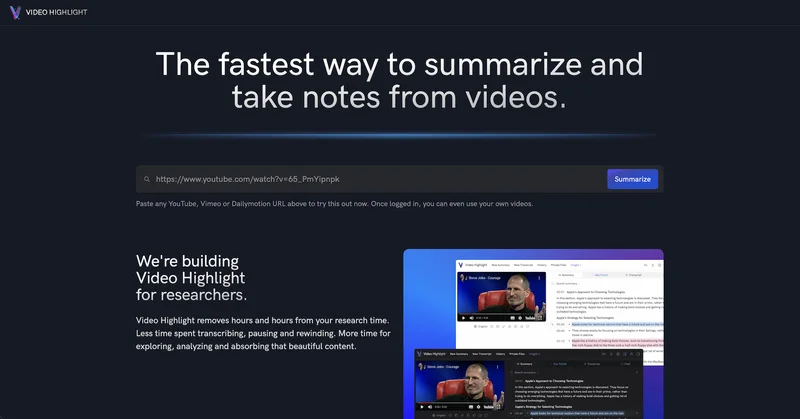
Video Highlight is an AI-powered tool designed to help users summarize and take notes from videos in a fast and convenient manner, enabling a more interactive and efficient engagement with video content.
Video Highlight leverages AI technology to extract key points from videos, facilitating an efficient and streamlined process for video note-taking. It's able to take in video content and systematically identify and present crucial information, enabling users to focus more on analysis rather than manual transcription.
Real ratings and feedback from the community
Be the first to share your rating and comments for this AI tool!
How Video Highlight stacks up against top competitors
| Feature | Video Highlight | JustRecap | TLDWAI | Floodcraft |
|---|---|---|---|---|
| Rating | ★ 3 | — | ★ 3 | ★ 3 |
| Pricing Model | paid | freemium | freemium | paid |
| API Access | No | No | No | No |
| Open Source | No | No | No | No |
| Link | Visit Website | Visit Website |
Explore similar AI tools in this category
The user interface of Video Highlight is designed to be clean, intuitive, and user-friendly, combining elegant design with world-class performance. This means that users can navigate and utilize the tool effectively, with minimal learning curve.
Through Video Highlight, users can find specific information within a video by utilizing transcripts and timestamps. This allows users to quickly and easily skim through the contents of a video.
Yes, Video Highlight allows users to add screenshots to their notes. This feature assists users to remember key moments from the content they've interacted with.
Users can export their notes directly from Video Highlight to tools such as Roam Research, Notion, Evernote, or connect with Readwise accounts. This connectivity provides seamless research and study processes, as users can transfer information to their preferred platforms.
Yes, Video Highlight is fully compatible with YouTube videos. Users can summarize and take notes from any YouTube video using Video Highlight.
The target audience of Video Highlight are individuals who desire to enhance their research efficiency by minimizing transcription efforts and sharpening their analytical focus. It is also beneficial for those who look to engage more actively and deeply with video content.
Yes, Video Highlight is optimized for desktop use. This allows users to take advantage of better visibility and processing capabilities of desktops for their video note-taking activities.
Video Highlight facilitates efficient video note-taking by employing AI technology to distil key points from every video. It creates transcripts and timestamps, providing a quick yet comprehensive overview of the video. Additionally, it allows users to add screenshots to their notes for easy remembrance and reference of key moments.
Unlike traditional note-taking tools, Video Highlight is specifically designed for interaction with video content. It does more than transcription; it extracts key points, creates timestamps for easy reference, and allows for screenshots. It optimizes the video note-taking process, enabling users to get more value from their videos.
Yes, Video Highlight can work seamlessly with other research tools like Roam Research and Evernote. It provides the ability for notes to be exported directly into these tools, further enhancing users' research processes.
Video Highlight is beneficial for in-depth engagement with video content as it makes it easier to extract key points, find specific information in a video, and add screenshots to notes. This shifts the user's effort from mechanics of note-taking to intellectual engagement with the content, thereby promoting deeper learning and understanding.
Yes, there is current high demand for Video Highlight, as indicated by an overwhelming surge. It is a tool that addresses a specific need in the niche of video-based learning and research, providing efficiency and value that is recognized by its users.
In response to the current overwhelming demand, the Video Highlight team is diligently working towards expanding their infrastructure. This is aimed at improving the tool's capacity, performance, and overall user experience.
The benefits of using Video Highlight for research purposes include time-saving on transcribing, pausing and rewinding videos. Instead, users can explore, analyse and absorb the video content more effectively. Key moments can be directly associated with screenshots, and notes can be exported directly to popular tools like Roam Research, Notion, Evernote, or connected to Readwise accounts.
Yes, you can try out Video Highlight with any YouTube video. This offers flexibility and wide applicability for users across different topics and content available on YouTube.
Absolutely, Video Highlight provides transcripts and timestamps for the video content. This helps users find specific details within the video, skim through content before deciding to watch it in full, and make indexing and referencing more convenient.
Video Highlight is a fast note-taking tool for videos due to its application of AI technology. This allows it to extract key points from videos quickly, create transcripts and timestamps, and enable users to engage with video content like they would with text-based content.
Connecting your Video Highlight to a Readwise account involves exporting the notes directly. This enables a smooth transfer of data for streamlined research, allowing important notes from videos to be incorporated into your Readwise account.
| Visit Website |
| Visit Website |

Signal, not noise curated video intelligence for AI-era investors

Get a summary of any long YouTube video, powered by AI.

Lovable
Lovablev2.2 turns your app ideas into live web apps instantly with AI and simple prompts-no coding required for fast MVPs and prototypes.


