

Storytell.aiQ&A AI Tool
Streamlined content browsing and summarization.
Q&A0
Streamlined content browsing and summarization.
Overall
Average of 1 data signal below
3 of 4 content areas filled (features, FAQs, pros/cons, description)
This score is calculated automatically from this listing's available data (community rating, capabilities, pricing transparency, and documentation). It is not a paid or sponsored review.
Pricing & Model
unknown
Open Source & API
Proprietary
No Public API
Foundational Model
Proprietary Engine
Key Integrations
Web App Only
Common queries about Storytell.ai answered
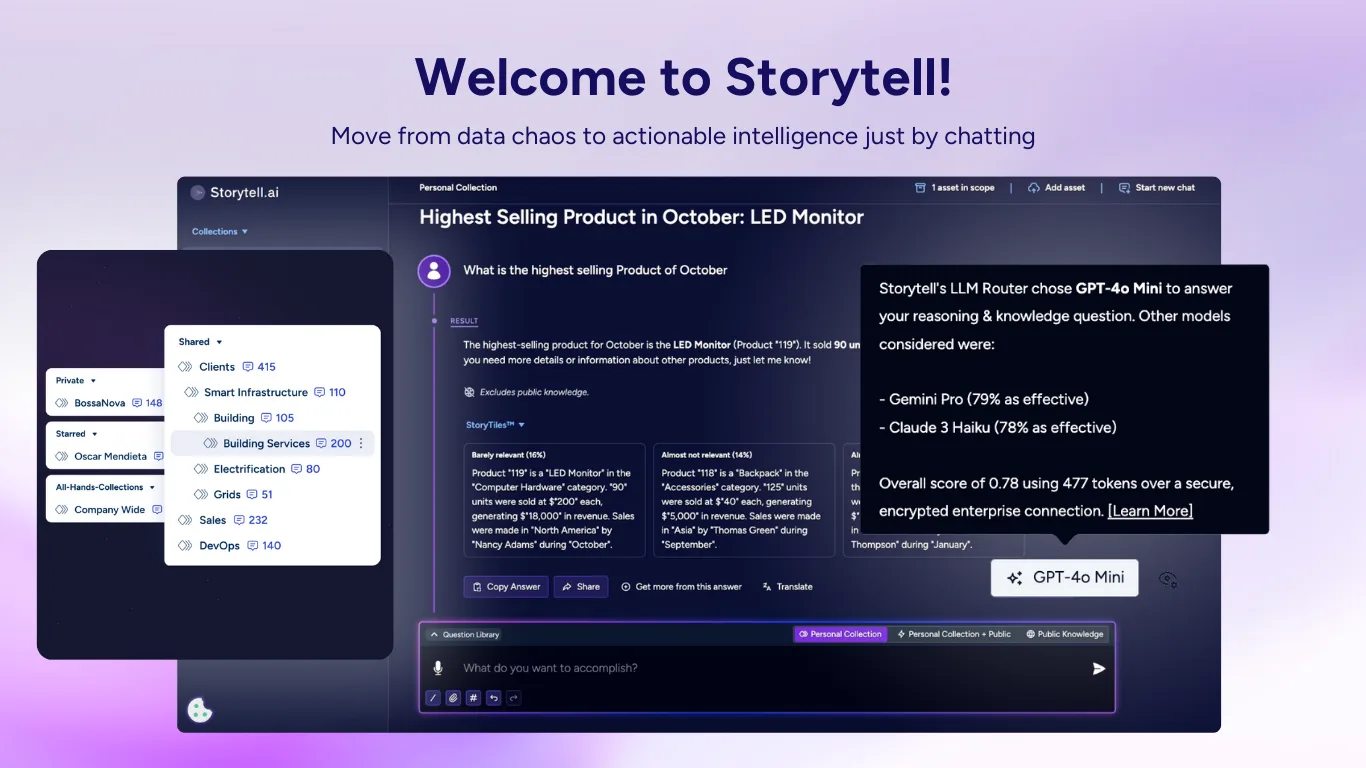
Storytell.ai is an advanced AI tool designed to aid users in distilling signal from noise and navigating through their content more competently. It provides a chat-based interface that allows users to summarize virtually anything online.
The core features of Storytell.ai encompass a chat-based interface for interaction, options to upload various file types such as PDFs, MP3s, BETAs, MP4s, YouTube videos, text, and web pages. Other remarkable features include content navigation, a Chrome extension, summarizing online content, and more.
Real ratings and feedback from the community
Be the first to share your rating and comments for this AI tool!
How Storytell.ai stacks up against top competitors
| Feature | Storytell.ai | Just the Answer | Amanu | Semafind |
|---|---|---|---|---|
| Rating | — | ★ 3 | ★ 3 | — |
| Pricing Model | unknown | Paid | freemium | paid |
| API Access | No | No | No | No |
| Open Source | No | No | No | No |
| Link | Visit Website | Visit Website |
Explore similar AI tools in this category
Yes, Storytell.ai supports a variety of file formats for user convenience. You can upload PDFs, MP3s, BETAs, MP4s, text, and even URLs for online content, including YouTube videos and web pages.
Storytell.ai provides an intuitive chat-based interface that streamlines your content navigation. You can upload any file or URL, and the tool will sort it, summarizing the information. It helps users zero in on essential details, saving considerable time and effort.
Absolutely. One of Storytell.ai's primary features is its capacity to summarize online material. By uploading a URL or using the Chrome extension, users can get condensed, focused content quickly and accurately.
Storytell.ai supports a wide range of media including, but not limited to, PDFs, MP3s, BETAs, MP4s, YouTube videos, text, and web content. The diverse array of supported media formats makes it a versatile tool for content consumption.
To start using Storytell.ai, you can upload a file or a URL or use the designed Chrome extension to initiate interaction. The tool will then sift through the content and provide a summarization or navigation option based on your choice.
Yes, indeed. Storytell.ai affords you a chrome extension for instant and more efficient use. You can install it from the Chrome Webstore for use when browsing through online content.
Yes. Storytell.ai has been designed with the principle objective of helping users filter out unnecessary information. By summarizing and highlighting the essential elements of the content, it assists users in focusing on what is truly important.
To use Storytell.ai, you need to have JavaScript enabled in your web browser. This is requisite to access all its interactive features and capabilities.
Storytell.ai provides an easy-to-use chat-based interaction feature. The interface is customer-centric, and it is designed to promote effortless navigation and utilization of its summarization capabilities.
Storytell.ai provides various options for uploading and interacting with content. Users can upload a variety of file types including PDFs, MP3s, BETAs, MP4s, YouTube videos, text, and web pages. They can also enter URLs directly or use the Chrome extension for smoother, more efficient browsing and summarizing.
Storytell.ai is proudly made in California. It indicates a compelling blend of technology and love, signifying the passion embedded in its creation.
Yes, Storytell.ai can process both audio and video content. It supports MP3 and MP4 file formats, along with the option to summarize content from YouTube videos.
Storytell.ai's primary objective is to be highly efficient in distilling signal from noise. However, its exact efficiency hasn't been stated explicitly, suggesting that the extent to which it achieves this goal may vary based on user experience and the complexity of the content.
Yes. Storytell.ai is equipped to handle both web pages and files. Users can upload a range of different file types or directly input URLs to get started.
You can learn more about the team behind Storytell.ai on its About section accessible from their website. It provides details about the crew and their individual contributions to the project.
Storytell.ai aims to help users reclaim their time by providing a secure and quick way for them to filter out unnecessary information. The tool sifts through the uploaded content and summarizes key points, aiding users to grasp vital information promptly.
Storytell.ai is designed to handle a wide variety of content, leading to high versatility. It's suitable for textual content like PDFs and web pages, audio content like MP3s, video materials like MP4s and YouTube videos, making it an ideal summarization tool for almost all types of content.
The effectiveness of Storytell.ai's AI algorithms hasn't been explicitly stated. While its aim is to distill signal from noise to provide efficient content navigation, the degree of efficiency or effectiveness would likely depend on the complexity of the content and the user's experience.
| Visit Website |
| Visit Website |

Lovable
Lovablev2.2 turns your app ideas into live web apps instantly with AI and simple prompts-no coding required for fast MVPs and prototypes.


