

PromptScaperPrototyping AI Tool
Quickly prototype ideas for conversational agents
Prototypingfree
Quickly prototype ideas for conversational agents
Overall
Average of 2 data signals below
Basic pricing published
3 of 4 content areas filled (features, FAQs, pros/cons, description)
This score is calculated automatically from this listing's available data (community rating, capabilities, pricing transparency, and documentation). It is not a paid or sponsored review.
Pricing & Model
free
free
Open Source & API
Proprietary
No Public API
Foundational Model
Proprietary Engine
Key Integrations
Web App Only
free
See full pricing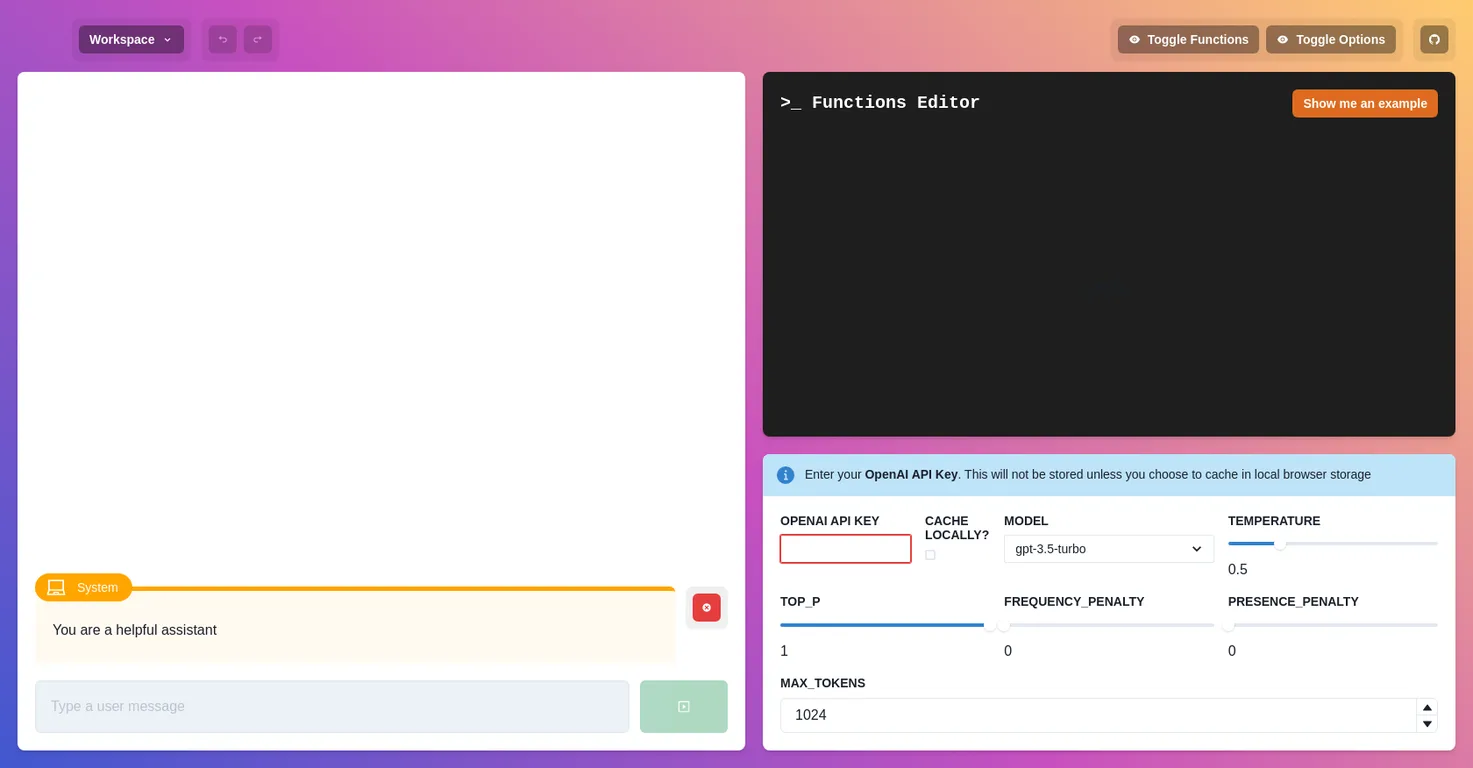
Common queries about PromptScaper answered
PromptScaper is an artificial intelligence tool designed for prototyping conversational agents. It allows users to simulate possible responses from these agents, providing a platform for quick evaluation and development of chatbots.
PromptScaper offers features such as: simulation of agent responses, a workspace to share with colleagues, and a built-in feature to save these workspaces. It also allows for exporting and importing of work for convenience. There's function editing and users can make use of open AI API keys as well.
Real ratings and feedback from the community
Be the first to share your rating and comments for this AI tool!
How PromptScaper stacks up against top competitors
| Feature | PromptScaper | PlayTorch | GPT Engineer | Polymet |
|---|---|---|---|---|
| Rating | ★ 3 | ★ 3 | — | — |
| Pricing Model | free | free | freemium | free |
| API Access | No | No | No | No |
| Open Source | No | No | No | No |
| Link | Visit Website | Visit Website |
Explore similar AI tools in this category
Build and iterate on interactive web apps using natural language.
Polymet is an AI-powered cloud cost optimization platform designed for Kubernetes and cloud-native environments. It provides deep visibility into cloud spend, identifies optimization opportunities, and automates cost-saving actions to reduce infrastructure expenses.

PromptScaper enables the creation of prototypes by simulating potential responses of the imagined conversational agents. This allows the user to assess the viability and functionality of these agents without the need to build the tools first.
No, PromptScaper is a no-code platform. Meaning, you can use it to prototype your conversational agents without any coding skills.
LLM in PromptScaper context currently doesn't have a provided definition.
PromptScaper facilitates the evaluation of chatbot ideas by allowing users to simulate the tools and responses of the conversational agents. This way, the users can assess the effectiveness of their concepts before going into the actual development phase.
You can share workspaces with your coworkers in PromptScaper by saving them. This allows others to access the workspace and contribute to the prototyping process.
Yes, you can save your work in PromptScaper and come back to it later. This feature is particularly useful for long-term projects where you might need to pause and resume work.
PromptScaper provides options to export and import work. These options allow you to easily move your work or share it with others for collaboration.
Yes, PromptScaper has a Toggle Functions option. It lets you switch between different functions within the tool, possibly improving workflow when developing your prototype.
The exact place to find examples of using PromptScaper is not specifically stated. However, there might be contextually relevant examples available on their website or on the internet.
In PromptScaper, you enter your OpenAI API Key in the designated field labeled 'OPENAI API KEY'. It's an input field where you can type or paste in your key.
PromptScaper will not store your OpenAI API Key unless you choose to cache it in local browser storage.
In PromptScaper, the model options you can select from include gpt-4, gpt-4-32k, gpt-3.5-turbo and gpt-3.5-turbo-16k.
The 'Temperature' setting in PromptScaper controls the randomness of the AI's output. A lower temperature will yield more deterministic results, while a higher temperature makes the output more random.
'Frequency Penalty' and 'Presence Penalty' in PromptScaper are settings that control the conversational agent model's behaviour. The exact purpose or effect of these settings is not explicitly described.
The set limit for maximum tokens is not specified for PromptScaper. It could be set by the user or determined by the conversational agent model in use.
Yes, you need an OPENAI API KEY to use PromptScaper as it uses OpenAI models for simulating conversational tools.
'Cache locally' in PromptScaper means storing the information (like your OpenAI API Key) within your browser storage. This ensures your Key is available for use next time, without the need to re-enter it.
In PromptScaper, you can select a different model from the 'Model' dropdown menu. Available options include gpt-4, gpt-4-32k, gpt-3.5-turbo and gpt-3.5-turbo-16k.
| Visit Website |
| Visit Website |
Fliki
Compare Fliki's free and paid tiers to see how this text-to-video AI tool simplifies social media, blog-to-video, and content marketing production.


