

PhotospellsImage editing AI Tool
Professional photo editing empowered by AI.
Photospells Listing Score
Auto-calculatedOverall
Average of 1 data signal below
3 of 4 content areas filled (features, FAQs, pros/cons, description)
This score is calculated automatically from this listing's available data (community rating, capabilities, pricing transparency, and documentation). It is not a paid or sponsored review.
Capabilities & Key Tasks
Atomic Answer Block (Fact Checked)
Pricing & Model
freemium
Open Source & API
Proprietary
No Public API
Foundational Model
Proprietary Engine
Key Integrations
Web App Only
About Photospells
Pros
- Professional photo editing
- Automated tools
- Adjust colors
- Sharpness control
- Contrast control
- Blemish removal
- Filter application
- Intuitive user interface
- Library of templates
- Online community
- Color correction
- Image restoration
- Detailed retouching
- Intelligent editing
- Efficiency boost
- Adaptable tool
- Accurate editing
- Simplifies editing process
- User control
- Preserves personal customization
- High-quality outputs
- Useful for hobbyists
- Eases task of editing
- Eliminates manual guesswork
- Balances automation and customization
- Suitable for professional use
Cons
- Limited personal customization
- No offline mode
- May not support RAW files
- Template library might be limited
- No collaborative editing
- Lacks advanced editing tools
- No mobile app version
- Not suitable for large batches
- Community interaction might be limited
Frequently Asked Questions
Common queries about Photospells answered
What is Photo Spells?
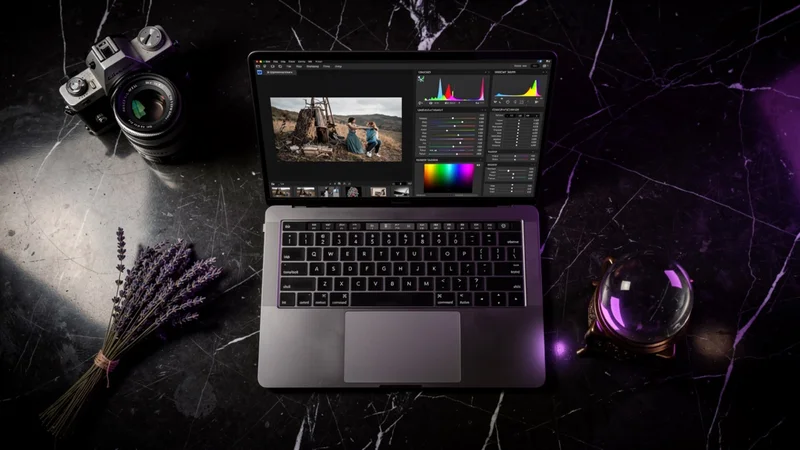
Photo Spells is an AI-powered tool that allows users to edit photos professionally and efficiently. It has a suite of automated tools that provide various functions such as color adjustment, contrast tuning, sharpness improvement, blemish removal, and filter application to enhance images. It also provides a collection of professionally designed templates and features an online community of editors and photographers.
How does Photo Spells utilize AI in photo editing?
Photo Spells leverages AI to automate and enhance various aspects of photo editing. AI analysis is foundational to the tool which intelligently applies suitable edits based on its understanding of imagery, thus helping the user to eliminate manual guesswork. The AI can perform tasks such as image restoration, color correction, and fine retouching.
What are some key features of Photo Spells?
Key features of Photo Spells include automated tools for color adjustment, sharpness improvement, contrast tuning, and blemish removal. It also offers a range of filters and a library of professional templates. In addition, Photo Spells houses an online community where users can share tips, tricks, and edits.
Can Photo Spells adjust the sharpness and contrast of my photos?
Yes, Photo Spells can adjust the sharpness and contrast of photos. It includes automated tools for fine-tuning the sharpness, clarity, and contrast of images to optimize visual appeal.
Does Photo Spells offer templates for photo editing?
Yes, Photo Spells offers a library of professionally designed templates that users can utilize to garnish their images and enhance visual outcomes.
Can I remove blemishes with Photo Spells?
Yes, blemish removal is among the AI-powered automated features of Photo Spells, allowing users to create flawless images without manual effort.
How does the community feature of Photo Spells work?
The online community of Photo Spells is a place where users can interact with other photographers and editors. Users can share their edited photos, tips, tricks, and techniques for the optimization of photo editing, getting assistance and advice from peer users.
Is Photo Spells suitable for beginners in photo editing?
Yes, Photo Spells is suitable for beginners in photo editing. Its intuitive interface and automated tools make photo editing simple and efficient, even for those with no prior experience.
Can Photo Spells help me with color correction?
Yes, color correction is one of the key aspects of photo editing that Photo Spells handles with great efficiency, all thanks to its robust AI. It analyzes each image and applies the most suitable color adjustments based on image quality and content.
How can Photo Spells benefit professional photographers?
Photo Spells can greatly benefit professional photographers by enabling efficient and high-quality edits. The AI automates various editing tasks, reducing manual effort and time. Detailed retouching, color correction, image restoration are some of the professional-grade features offered by Photo Spells, which professionals can leverage to optimize their work.
What makes Photo Spells stand out from other photo editing tools?
Photo Spells stands out from other photo editing tools for its AI-powered automation, adaptability to different types of photos, balance between automation and personal customization, and its online community feature that fosters learning and cooperation among users.
How does Photo Spells intelligent editing feature work?
The intelligent editing feature of Photo Spells leverages the power of AI to understand image content and quality, and applies edits accordingly. It reduces the need for manual guesswork and allows users to achieve better results faster and easier.
How can I control the level of automation in Photo Spells?
Users can control the level of automation in Photo Spells by choosing when and where to apply the AI-powered tools. Though the tool brings automation to photo editing, it also allows for a balance of automation and personal customizations, catering to the user's individual preference for each project.
Does Photo Spells provide tools for detailed retouching of photos?
Yes, Photo Spells provides tools for detailed retouching of photos. It utilizes AI to determine and apply the most suitable retouching for any given image.
Can Photo Spells restore old or damaged photos?
Yes, one of the AI-assisted tasks that Photo Spells handles proficiently is image restoration. This feature can be particularly beneficial for old or damaged photos that require careful and detailed retouching.
Is Photo Spells suitable for different types of photos?
Yes, Photo Spells is designed with adaptability in mind, making it suitable for different types of photos. The AI-powered tool analyzes each image individually, applying edits that are most suited to the specifics of the image.
How does Photo Spells contribute to increased efficiency in photo editing?
Photo Spells helps boost efficiency in photo editing by automating numerous editing tasks. It eliminates manual guesswork in editing, accurately applies preferable edits, and significantly reduces the time and effort required for photo editing.
Is Photo Spells well-suited for photography hobbyists?
Yes, Photo Spells is well-suited for photography hobbyists. In addition to its robust AI-based editing tools, it also hosts an online community platform where hobbyists can interact, learn from each other, share photos, and enhance their skills.
How does Photo Spells ensure high-quality outputs?
Through its AI-powered editing tools, Photo Spells ensures high-quality outputs. It applies detailed retouching, color corrections, and image restoration where necessary, significantly enhancing the final image result. The quality of edits is professional-level, ensuring that users achieve visually appealing and well-finished images.
Do I need any additional equipment or software to use Photo Spells?
No, you do not require any additional equipment or software to use Photo Spells. All its features, templates, and functions are accessible online, saving you from the expense of additional equipment or software.
User Reviews
Real ratings and feedback from the community
No reviews yet
Be the first to share your rating and comments for this AI tool!
Direct Comparison Table
How Photospells stacks up against top competitors
| Feature | Photospells | Magnific | Pixcleaner | Vertexshare |
|---|---|---|---|---|
| Rating | ★ 3 | ★ 3 | ★ 3 | — |
| Pricing Model | freemium | free_trial | freemium | freemium |
| API Access | No | No | No | No |
| Open Source | No | No | No | No |
| Link | Visit Website | Visit Website | Visit Website | Visit Website |
Alternatives to Photospells
Explore similar AI tools in this category


Tool Details
Similar Tools

Fliki
Compare Fliki's free and paid tiers to see how this text-to-video AI tool simplifies social media, blog-to-video, and content marketing production.

Lovable
Lovablev2.2 turns your app ideas into live web apps instantly with AI and simple prompts-no coding required for fast MVPs and prototypes.

Vsub
Create faceless videos in seconds with AI

HeyGen
Business videos with custom avatars & voiceovers.