

NotesOllamaChatting in Apple Notes AI Tool
Interact with local LLMs in Apple Notes.
Chatting in Apple Notes0
Interact with local LLMs in Apple Notes.
Overall
Average of 1 data signal below
3 of 4 content areas filled (features, FAQs, pros/cons, description)
This score is calculated automatically from this listing's available data (community rating, capabilities, pricing transparency, and documentation). It is not a paid or sponsored review.
Pricing & Model
Free
Open Source & API
Proprietary
No Public API
Foundational Model
Proprietary Engine
Key Integrations
Web App Only
Common queries about NotesOllama answered
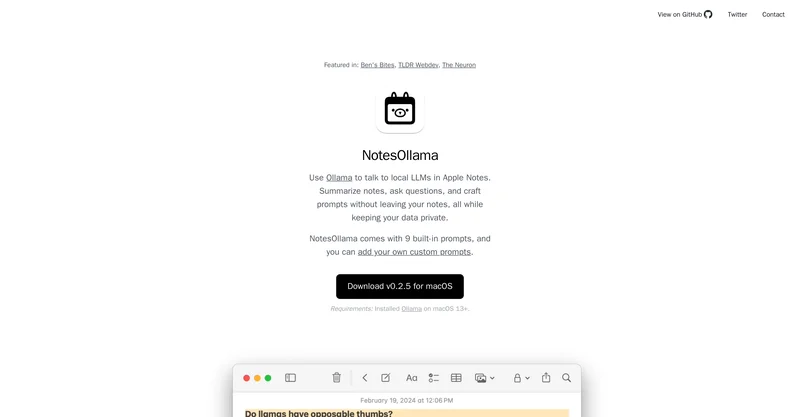
The main purpose of NotesOllama is to leverage the functionality of Apple Notes by facilitating communication with Local Learning Modules (LLMs). It is designed to aid users in summarizing notes, asking questions, and creating custom prompts without having to leave their notes, ensuring enhanced productivity and functionality.
The system requirements for using NotesOllama include an installed version of Ollama on macOS 13 or later.
NotesOllama enhances the functionality of Apple Notes by providing a unique system of prompts that allows users to interact with their notes in a more dynamic and personalised way. It helps in summarization of notes, and facilitates the creation and customization of prompts without the need for switching between apps.
Real ratings and feedback from the community
Be the first to share your rating and comments for this AI tool!
How NotesOllama stacks up against top competitors
| Feature | NotesOllama | Mumble Note: AI Voice Notetakerv0.7.10 | Fliki | Lovable |
|---|---|---|---|---|
| Rating | ★ 3 | ★ 3 | ★ 4.8 | — |
| Visits / month | — | — | 692,189 | 34,814,456 |
| Pricing Model | Free | freemium | freemium | freemium |
| API Access | No | No | No | No |
| Open Source | No | No | No | No |
| Link | Visit Website |
Explore similar AI tools in this category
Mumble Note is an AI notetaker designed to be the fastest way to capture your scattered thoughts, and turn them into organized notes. You can speak, type or do them both. AI will combine your inputs t
IDK
In the context of NotesOllama, Local Learning Modules (LLMs) are interactive modules with which users can communicate within Apple Notes. These modules allow for a more personalized and dynamic interaction with notes.
Users can customize their experience with NotesOllama by adding their own custom prompts. This is in addition to the nine pre-configured prompts that come with the tool, allowing for a tailored approach to note interaction.
NotesOllama helps in summarizing notes by facilitating dynamic and personalized interaction through its unique system of prompts. While the exact method is not explicitly stated on their website, the inherent implication is that the tool allows users to more easily extract and compile key points, aiding in more effective note summarization.
The in-app use feature of NotesOllama refers to the convenience it provides by enabling users to perform various actions, like note summarization, question asking, and prompt creation, directly within Apple Notes, thus eliminating the need for application switching.
Yes, the prompts within NotesOllama can be customized. The tool allows users to create and customize their own prompts, adding to the nine pre-configured prompts that come with the tool.
The exact nature of the nine pre-configured prompts provided with NotesOllama is not disclosed on their website.
Yes, it is possible to create your own prompts in NotesOllama. The tool provides a feature for users to add their own custom prompts, therefore offering a personalized approach to interacting with notes.
Yes, there is potential for NotesOllama to be integrated with other plugins. This is indicated by the mention of a compatible tool 'NotesCmdr', which offers slash commands, markdown, and templates for Apple Notes.
'NotesCmdr' is mentioned on their website as a tool offering slash commands, markdown and templates for Apple Notes, hinting that it may be compatible with or complementary to NotesOllama, although the precise nature of this relationship is not clarified.
NotesOllama helps in maintaining user data privacy by keeping all interactions within the user's notes, negating the need to export data to other applications or services.
There isn't any explicit information about whether or not NotesOllama could be used for task management on their website.
Ollama serves as the facilitating platform for NotesOllama. It is necessary to install Ollama on macOS 13 or later to use NotesOllama.
NotesOllama contributes to productivity enhancement by providing an integrated environment within Apple Notes, allowing users to create personalized prompts, summarize notes, and interact dynamically with their notes without leaving the application. This minimizes distraction and streamlines the note management process.
Yes, it is possible to chat with LLMs (Local Learning Modules) in Apple Notes using NotesOllama. This feature allows users to interact with their notes in a more dynamic and personalized way.
While the website does not directly comment on the user-friendliness of NotesOllama, the mention of in-app functionality, custom prompts, and enhanced productivity could potentially indicate a user-friendly design.
NotesOllama can be a useful education tool as it facilitates better interaction with notes, enables dynamic conversation with Local Learning Modules (LLMs), and helps in note summarization - all within the application. These features can be particularly useful for students or educators working on complex topics that require diligent note keeping and review.
| Visit Website |
| Visit Website |
| Visit Website |
Lexi AI is an AI-powered research assistant that helps users read, summarize, and extract key information from various documents. It allows users to chat with their documents, ask questions, generate new content, and organize their research efficiently.

Lovable
Lovablev2.2 turns your app ideas into live web apps instantly with AI and simple prompts-no coding required for fast MVPs and prototypes.


