

Dynaboard AICoding AI Tool
Generates code and designs UI for software development.
Coding2 views
Generates code and designs UI for software development.
Overall
Average of 1 data signal below
3 of 4 content areas filled (features, FAQs, pros/cons, description)
This score is calculated automatically from this listing's available data (community rating, capabilities, pricing transparency, and documentation). It is not a paid or sponsored review.
Pricing & Model
free_trial
Open Source & API
Proprietary
No Public API
Foundational Model
Proprietary Engine
Key Integrations
Web App Only
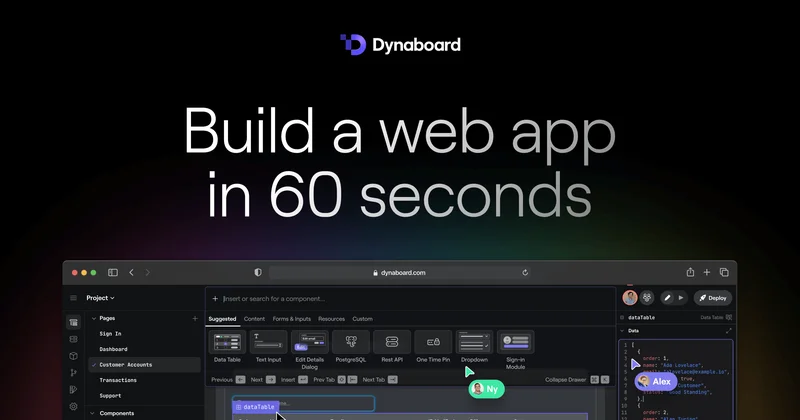
Common queries about Dynaboard AI answered
Dynaboard AI is a suite of AI functionalities aimed at accelerating the process of building custom, production-grade software. It offers developers key features, including UI generation, code generation, and code refactoring, and allows for the design, development, and deployment of software using natural language.
Dynaboard AI enables developers to expedite the software development process by providing support for UI generation, code generation, and code refactoring. By typing prompts into the command bar, developers can generate interactive UI components like charts, tables, and dropdowns. Dynaboard AI can generate TypeScript/JavaScript, SQL, and CSS in any code or query editor and it enables addition of interactivity in the form of filters for charts and tables. Moreover, it allows developers to modify existing apps with ease as it's context-aware of the developers' pages, functions, components, and database schema.
Real ratings and feedback from the community
Be the first to share your rating and comments for this AI tool!
How Dynaboard AI stacks up against top competitors
| Feature | Dynaboard AI | Codelab | Jit Codes | Aiac.dev |
|---|---|---|---|---|
| Rating | ★ 3 | ★ 3 | — | — |
| Pricing Model | free_trial | Free | free | free |
| API Access | No | No | No | No |
| Open Source | No | No | No | No |
| Link | Visit Website | Visit Website |
Explore similar AI tools in this category
The three key features of Dynaboard AI are UI Generation, Code Generation, and Code Refactoring. These features enable developers to quickly create data-rich UIs, generate TypeScript, JavaScript, SQL, and CSS in any code or query editor, and modify code and queries anywhere in an application respectively.
Dynaboard AI supports TypeScript, JavaScript, SQL, and CSS programming languages. It allows developers to generate code in these languages for any code or query editor.
The UI generation feature in Dynaboard AI allows developers to create interactive UI components effortlessly. They can type prompts into the command bar to generate data-rich forms with automatically configured components. It also enables the creation of charts, tables, and dropdowns that link to PostgreSQL, MySQL, or BigQuery databases.
Dynaboard AI generates code via a simple process of prompts in which developers type what they want to develop or change. Using natural language processing, Dynaboard AI can generate code in TypeScript or JavaScript, SQL, and CSS in any code or query editor. It also allows developers to establish a link with databases such as PostgreSQL, MySQL, or BigQuery.
Dynaboard AI assists with code refactoring by enabling developers to make updates anywhere in their application, simply by explaining what changes they want to make. This allows for easy modification of code and queries, making it particularly useful for ongoing app maintenance and updates.
With Dynaboard AI, you can link PostgreSQL, MySQL, or BigQuery databases. This features allows the generation of data-rich UIs like charts, tables and dropdowns based on the linked database.
Dynaboard AI automates the creation of UI components through natural language prompts. Developers simply type their requirements into the command bar and Dynaboard AI automatically configures, places, and names the created components accordingly.
You can create interactive components with Dynaboard AI by typing into the command bar what kind of component you want. If it's a dropdown, for example, generated filters can also be used to make the dropdown interactive, and the filters can be used to filter tables and charts based on the dropdown input.
Yes, you can. Dynaboard AI is context-aware meaning it understands the pages, functions, components, and database schema of your applications. This provides a seamless experience and enables users to easily modify existing applications with the built-in tools provided by Dynaboard AI.
For new developers, the Dynaboard AI experience is user-friendly and seamless. The tool is designed to automate the tedious parts of the development process, thereby making it easy for new developers to navigate and use. Its features like code generation, UI creation, and automated documentation helps new developers to get a jump start into development fast.
Dynaboard AI streamlines the development of complex software by automating time-consuming aspects of development. These include the initial creation of UI components, the generation and refactoring of code, and the documentation and debugging processes. By offloading these tasks onto Dynaboard AI, developers have more time to focus on higher-level design and strategic decisions.
You can share your feedback on Dynaboard AI either directly within the tool, using the up- and down-vote feature in the editor, or via Twitter through the Dynaboard AI's official account.
Yes, there is a free trial available for Dynaboard AI. It can be accessed through the Dynaboard editor.
Dynaboard AI plans to integrate features to tackle maintaining documentation and fixing bugs. While specific functionalities aren't mentioned explicitly, it is indicated to be a part of their roadmap to reduce the time and effort required to build and maintain production-grade software.
Dynaboard AI can be accessed through the Dynaboard editor. It offers an easy-to-navigate interface that developers of all levels can use to streamline their software development process.
Dynaboard AI is planning on incorporating solutions for large-scale app development. While specifics aren't mentioned, it's included in their strategy to tackle time-consuming and difficult aspects of app development.
Yes, Dynaboard AI does offer real-time filtering of data. Developers can create an always up-to-date dropdown that represents a database column in a single click, thus showing real-time data. They can also use Dynaboard AI to modify existing apps, such as updating a histogram query with an inline AI button and prompting it to filter the results based on a dropdown input.
Dynaboard AI is context-aware in the sense that it understands your pages, functions, components, and even database schema. This allows it to 'speak' your language and work with your specific app aspects effectively whether that's generating new code, creating new UI components, or refactoring your existing app functionalities.
| Visit Website |
| Visit Website |


