

DrawingPicsSketch to image AI Tool
Create unlimited images in a whiteboard, locally.
Sketch to imageFree + from $190
Create unlimited images in a whiteboard, locally.
Overall
Average of 2 data signals below
Basic pricing published
3 of 4 content areas filled (features, FAQs, pros/cons, description)
This score is calculated automatically from this listing's available data (community rating, capabilities, pricing transparency, and documentation). It is not a paid or sponsored review.
Pricing & Model
freemium
Free + from $19
Open Source & API
Proprietary
No Public API
Foundational Model
Proprietary Engine
Key Integrations
Web App Only
Free + from $19
See full pricing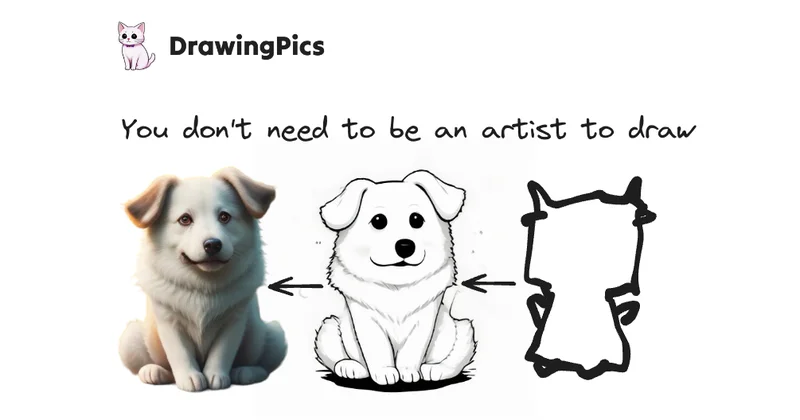
Common queries about DrawingPics answered
DrawingPics is an offline AI art generator tool that functions within a whiteboard interface. It applies cutting-edge AI methods, such as stable diffusion and LoRA models, to boost the image-creation process. The tool includes key features like 'Draw Fast Mode' and 'Draw Precision Mode'. It allows the download of SD1.5 models from popular AI art sites and enables the application of LoRA to any drawing mode for custom styles. Its design ensures user privacy and operational flexibility.
DrawingPics provides users with a whiteboard interface where they can draw and generate images using AI. Using advanced features such as the 'Draw Fast Mode', users can get image representations of their sketches, which utilizes Stable Diffusion's img2img technique. Furthermore, the 'Draw Precision Mode' helps to control line quality and optimize the draft's finalization process. It also allows the use of third-party AI art models, and users can adjust these models' parameters for preferred results.
Real ratings and feedback from the community
Be the first to share your rating and comments for this AI tool!
How DrawingPics stacks up against top competitors
| Feature | DrawingPics | NVIDIA Canvas | Vizcom AI | Drawings Alive |
|---|---|---|---|---|
| Rating | ★ 3 | ★ 4.7 | — | ★ 3 |
| Pricing Model | freemium | free | freemium | paid |
| API Access | No | No | No | No |
| Open Source | No | No | No | No |
| Link | Visit Website | Visit Website |
Explore similar AI tools in this category
DrawingPics offers several key features: the 'Draw Fast Mode' that uses Stable Diffusion's img2img technique, the 'Draw Precision Mode' for superior line control, the ability to download any SD1.5 model from AI art websites and apply LoRA to any drawing mode for customized styles, and the flexibility to adjust the model's parameters. In addition, DrawingPics manages the downloading and organization of model files for users.
The 'Draw Fast Mode' in DrawingPics is an AI-assisted feature that uses Stable Diffusion's img2img technique. This mode rapidly auto-completes a user's rough sketch, making it easier for users to create art quickly.
The 'Draw Precision Mode' in DrawingPics enables fine-tuned line control and accurate draft finalization. This mode empowers users to precisely control the final look and details of their artwork.
Yes, SD1.5 models Compatibility is an essential feature of DrawingPics. It allows users to download SD1.5 models from popular AI art websites for use within the tool.
With DrawingPics, users can customize their art style by applying LoRA to any drawing mode. Individuals can also adjust the parameters of the model they're using to achieve the required results, adding another layer of customization and control to their art creation process.
DrawingPics is designed for offline use, which significantly enhances user privacy. With offline functionality, user data and drawings aren't transmitted or stored online, thereby preventing unauthorized access or data breaches.
Yes, users can adjust the model's parameters in DrawingPics. This flexibility offers users the opportunity to achieve optimal results for their drafts based on their specific needs and style preferences.
Indeed, DrawingPics does handle the downloading and management of model files for the users. This feature allows users to focus more on creating their art and less on administrative tasks.
DrawingPics is continuously evolving through regular enhancements and updates. While the specific frequency of these updates isn't stated, users can expect constant improvements in the tool's functionalities.
Yes, you can use DrawingPics offline. It was specifically designed as an offline tool to provide operational flexibility and ensure user privacy.
DrawingPics extensively supports macOS. It was initially designed for this platform, supporting both M series and Intel chips.
Windows support for DrawingPics is currently in the works, although a specific release date is not yet known.
The commercial use of images created by DrawingPics depends on the models utilized. Users must follow the licensing rules of the models they download. If a model is free for commercial use, the generated images can consequently be used for commercial purposes.
The free version of DrawingPics offers the 'Draw Fast Mode', usage of custom models, custom LoRA, and an infinite canvas. The standard version, which can be bought with a one-time purchase fee, provides access to all DrawingPics features, including the 'Draw Precision Mode', email support, and lifetime updates. The standard version license is compatible with one device.
The system requirements for DrawingPics are not explicitly stated. However, based on its current compatible platforms, it can be deducted that it works with macOS M series and Intel chips. Future support for Windows is also expected.
DrawingPics employs AI techniques in image creation by using Stable Diffusion's img2img method and LoRA models. The use of these techniques helps accelerate auto-completion of rough sketches in 'Draw Fast Mode' and provides superior line control in 'Draw Precision Mode'.
DrawingPics uses a whiteboard interface to provide a clean, minimalist, and universally understood workspace for users. This interface helps to reflect and simulate the real-world experience of sketching on a whiteboard, making the tool intuitively accessible and user-friendly.
DrawingPics has a proactive provision for user feedback. Although the detailed process for submitting feedback is not specified in the provided details, this statement indicates an open channel for users to communicate their experiences and suggestions for enhancements.
| Visit Website |
| Visit Website |

Architectural sketches to realistic renders, quickly.

Turn doodles into stunning, photo-realistic art with AI!


