

DiagrammingDiagrams AI Tool
Create and edit complex workflow diagrams efficiently.
DiagramsFree + from $3/mo0
Create and edit complex workflow diagrams efficiently.
Overall
Average of 2 data signals below
Basic pricing published
3 of 4 content areas filled (features, FAQs, pros/cons, description)
This score is calculated automatically from this listing's available data (community rating, capabilities, pricing transparency, and documentation). It is not a paid or sponsored review.
Pricing & Model
freemium
Free + from $3/mo
Open Source & API
Proprietary
No Public API
Foundational Model
Proprietary Engine
Key Integrations
Web App Only
Free + from $3/mo
See full pricing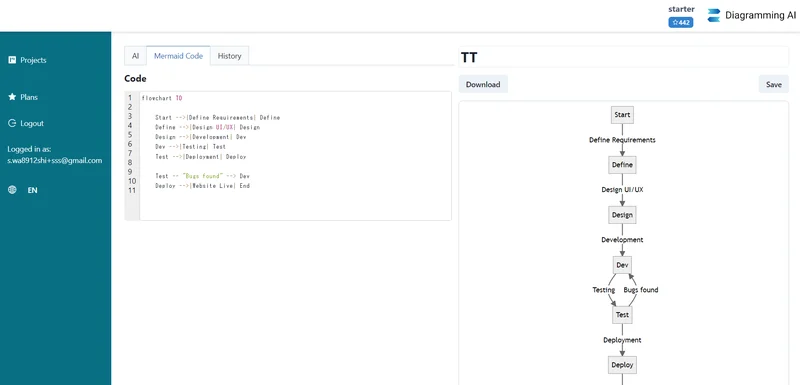
Common queries about Diagramming answered
Diagramming AI is an AI-powered tool that helps in creating and editing complex UML (Unified Modeling Language) structures and workflow designs. It allows users to create diagrams instantly and update them using AI commands. It also features an AI Chat function for discussions about diagrams and provides suggestions for diagram improvements and challenges.
Diagramming AI uses GPT-based AI to generate diagrams instantly from user-provided text. It delivers charts in a variety of formats such as flowcharts, sequence diagrams, Gantt charts, and more. Similarly, the AI Chat feature in the platform uses AI to make tailored suggestions for diagram improvements and challenges that can be instantly reflected onto the diagrams.
Real ratings and feedback from the community
Be the first to share your rating and comments for this AI tool!
How Diagramming stacks up against top competitors
| Feature | Diagramming | EdrawMax | Terrasketcher | Mermaid Chart |
|---|---|---|---|---|
| Rating | ★ 3 | ★ 3 | ★ 3 | — |
| Pricing Model | freemium | Paid | freemium | paid |
| API Access | No | No | No | No |
| Open Source | No | No | No | No |
| Link | Visit Website | Visit Website |
Explore similar AI tools in this category
Yes, with Diagramming AI, you can instantly update your diagrams using intuitive AI commands.
The AI Chat functionality in Diagramming AI allows users to engage with AI in discussions about their diagrams. It offers tailored suggestions for diagram improvements and challenges, effectively enhancing the diagramming process.
Yes, Diagramming AI can provide you with tailored suggestions for improving your diagrams. These suggestions are generated through the AI Chat platform, which engages in discussions with users about their diagrams.
Yes, Diagramming AI offers project-based Mermaid code storage, allowing users to create multiple projects and store numerous diagrams within each project. This feature allows for easy access and management of saved diagrams.
Yes, you can use Diagramming AI to create multiple diagram projects. The application provides project-based Mermaid code storage, which allows you to create and store multiple diagrams within each project.
Diagramming AI can benefit a wide range of users, including software developers, project managers, data analysts, educators, technical writers, business analysts, product managers, researchers, students, and marketing professionals.
You can download your diagrams from Diagramming AI in SVG/PNG formats.
Yes, Diagramming AI offers customizable color themes for your diagrams. It provides a selection of original color themes that you can change freely at any time.
Yes, Diagramming AI allows you to download diagrams in SVG/PNG formats for further editing and sharing.
'Mermaid code storage' in Diagramming AI refers to the system where you can create multiple projects and store your diagrams within each project as Mermaid-based codes. This way, you can easily access, manage, and update your saved diagrams.
Diagramming AI offers a range of pricing plans including a free tier with limited features, and premium tiers such as Lite for $3/month, Starter for $6/month and Pro for $14/month. The premium tiers offer access to more projects, diagrams, credits, and GPT-4 access for advanced AI capabilities.
Yes, GPT-4 access for advanced AI capabilities is included in the Starter and Pro pricing plans of Diagramming AI.
Yes, educators can use Diagramming AI to visually explain complex topics and ideas. Images and diagrams can be powerful tools in teaching, and Diagramming AI provides a quick and efficient means of creating these visual aids.
Yes, business analysts can utilize Diagramming AI to create and visualize flowcharts for business processes. The tool's features allow for more effective communication and understanding of complex business procedures.
Yes, researchers can use Diagramming AI to visually represent their findings and data. The tool helps transform intricate data and findings into easy-to-understand visual diagrams, aiding in comprehension and presentation of research.
Yes, marketing professionals can utilize Diagramming AI to visually represent their marketing campaign strategies and plans. Visual diagrams can help to improve understanding and communication of complex marketing strategies.
Yes, students can use Diagramming AI to visually map out their topics and ideas for study purposes. This can lead to better understanding and retention of knowledge.
Software developers can benefit from using Diagramming AI by using sequence diagrams and flowcharts to illustrate system design, or Gantt charts to visualize project timelines. This assists in conveying complex programming constructs and project timelines in a clear, visual format.
| Visit Website |
| Visit Website |


