

TagifyImage tagging AI Tool
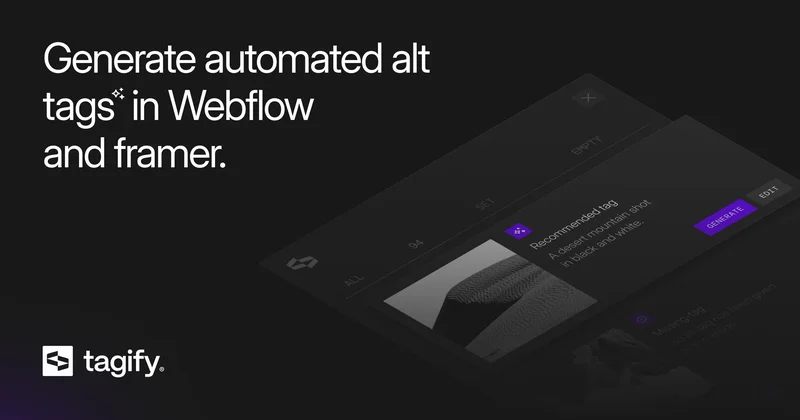
Automate alt tags generation in Webflow.
Image tagging1 views
Automate alt tags generation in Webflow.
Overall
Average of 1 data signal below
3 of 4 content areas filled (features, FAQs, pros/cons, description)
This score is calculated automatically from this listing's available data (community rating, capabilities, pricing transparency, and documentation). It is not a paid or sponsored review.
Pricing & Model
freemium
Open Source & API
Proprietary
No Public API
Foundational Model
Proprietary Engine
Key Integrations
Web App Only
Common queries about Tagify answered
Tagify is a tool designed exclusively for Webflow professionals such as developers, designers, and marketers. It leverages advanced AI capabilities to automate tasks related to alt-tagging. The solution generates SEO-friendly alt tags, saving valuable time and eliminating the need for manual input. Users retain full control as they can review, modify, or even rewrite the generated alt tags.
Tagify works by analyzing the images in a Webflow project. It automatically generates alt tags for new images and also searches for existing ones within a project to check if they need corrections for optimization. The alt tags can be edited at any point, providing users with maximum control. Furthermore, Tagify, through its integration with Azure AI, assures high accuracy and contextual relevance in the generated alt tags.
Real ratings and feedback from the community
Be the first to share your rating and comments for this AI tool!
How Tagify stacks up against top competitors
| Feature | Tagify | LoRA Tag | ImageSorter | Fliki |
|---|---|---|---|---|
| Rating | ★ 3 | — | — | ★ 4.8 |
| Visits / month | — | — | — | 692,189 |
| Pricing Model | freemium | freemium | paid | freemium |
| API Access | No | No | No | No |
| Open Source | No | No | No | No |
| Link | Visit Website |
Explore similar AI tools in this category
Tagify is best suited for Webflow professionals such as developers, designers, and marketers who regularly work on alt-tagging tasks. It's beneficial for anyone interested in automating the process of alt-tagging, enhancing SEO, improving web accessibility, and saving time.
Tagify uses the advanced capabilities of Azure AI to analyze images in a Webflow project automatically. It can identify the content of images and accordingly generate reliable and SEO-friendly alt tags. This process significantly reduces manual input and saves time.
The exact time savings could vary based on the size and complexity of the Webflow project. However, with the elimination of manual input for alt-tagging, the time savings using Tagify can be significant.
Yes, Tagify provides the option to manually edit the alt-tags it generates. Users can review, modify, or rewrite these tags at any given time based on their accuracy and relevance.
Yes, in addition to generating new alt tags, Tagify has the ability to search and review existing alt tags within a Webflow project. It checks if these existing tags need corrections for optimization.
The alt-tags generated by Tagify are known for their high degree of accuracy and contextual relevance. This is achieved through the integration with Azure AI, which provides advanced image recognition capabilities. However, the precision may vary with extremely abstract or unclear images.
At present, Tagify supports English for the generation of alt-tags. However, the support for languages other than English is planned for future updates.
No, there is no maximum limit on the number of images that Tagify can process in a Webflow project. It has the capability to generate alt-tags for an unlimited number of images.
While Tagify can handle a wide variety of images, it may have difficulties with extremely abstract or unclear images. Generating meaningful alt-tags for such images could be challenging, even with advanced AI capabilities.
Tagify optimizes alt tags for SEO by generating meaningful and relevant descriptions. The Azure AI integration allows for understanding and interpreting the content of images with high accuracy, therefore generating SEO-friendly alt tags.
Tagify integrates with Azure AI, which has advanced image recognition capabilities. This integration enables Tagify to understand and interpret the content of images with high accuracy, ensuring that the generated alt-tags are precise, meaningful, and SEO-friendly.
While their official website does not provide explicit information about a free trial, they offer a feature to test how Tagify AI generates alt tags for your images. Users can copy the link of an image hosted on platforms like Google or Unsplash and paste it into Tagify's generator.
To join the waiting list, visit the Tagify website and find the 'Join waiting list' option. Provide the necessary information and follow the prompts to complete your sign up.
Tagify is a technological innovation from ++addmore, a company run by Webflow professionals. The team includes Louis Demeester (Founder), Jens Deryckere (Full-stack Developer), Patrice Van Delm (Frontend Developer), Philippe Delfs (Sales), Robin Waroquier (Founder), and Wout Hardy (Founder).
Yes, a beta version of Tagify is scheduled to be available starting from the end of January 2024 in the Webflow App Store.
While Tagify currently supports only English for alt-tag generation, there are plans to include support for multiple languages in the future.
Tagify uses Azure AI's capabilities to ensure the relevance of its automated alt tags. It understands and interprets the content of images with a high degree of accuracy. This accurate interpretation helps in generating precise, meaningful, and contextually relevant alt-tags.
The initial release of Tagify will include the capability to automatically generate alt-tags for an unlimited number of images in English. Also, it will offer users the flexibility to review, improve, or rewrite the generated alt tags at any point.
| Visit Website |
| Visit Website |
| Visit Website |


