

JunoCode debugging AI Tool
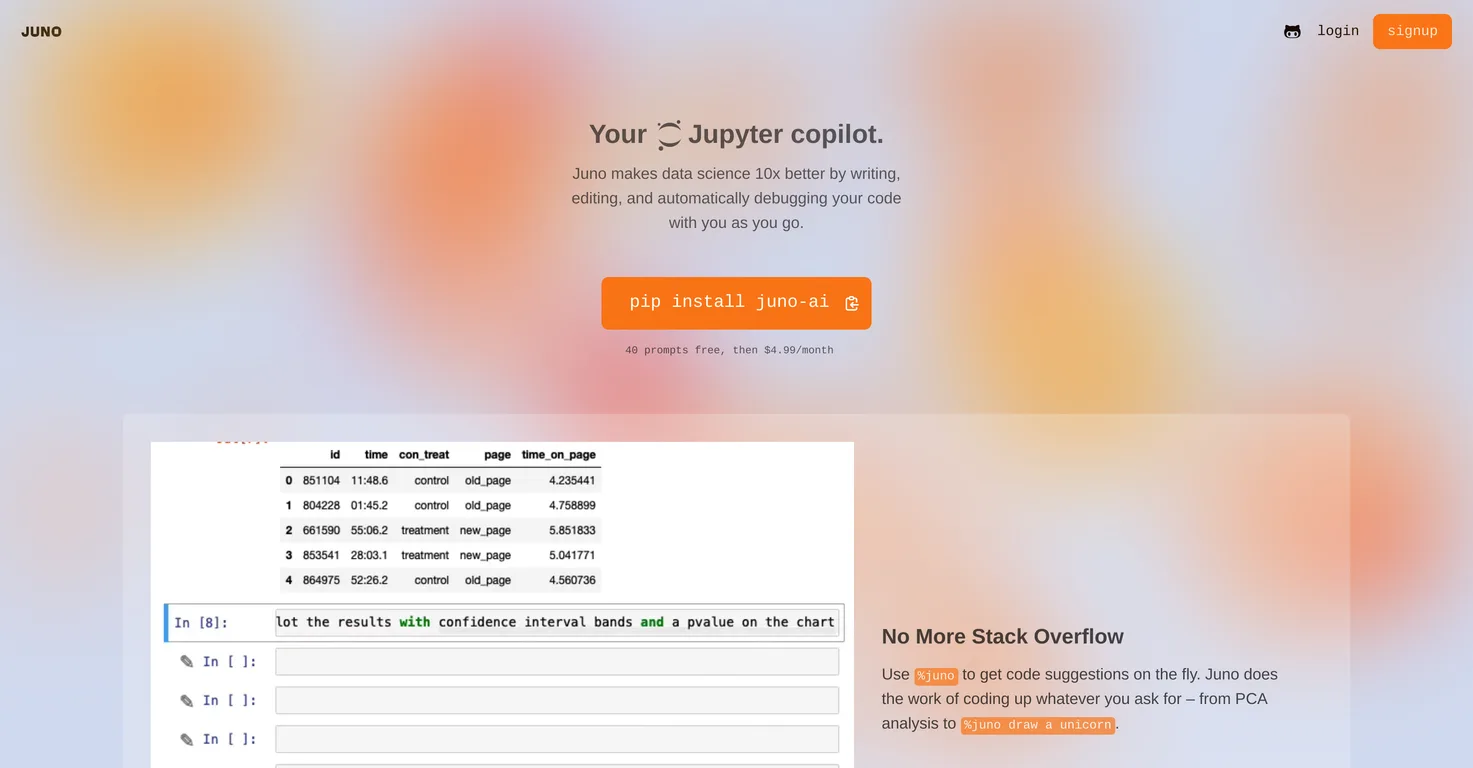
Juno makes data science 10x better by debugging your code automatically.
Juno Listing Score
Auto-calculatedOverall
Average of 1 data signal below
3 of 4 content areas filled (features, FAQs, pros/cons, description)
This score is calculated automatically from this listing's available data (community rating, capabilities, pricing transparency, and documentation). It is not a paid or sponsored review.
Capabilities & Key Tasks
Atomic Answer Block (Fact Checked)
Pricing & Model
paid
Open Source & API
Proprietary
No Public API
Foundational Model
Proprietary Engine
Key Integrations
Web App Only
About Juno
Pros
- Designed for data science tasks
- Integrated coding support
- Real-time code suggestions
- Efficient task handling
- Advanced debugging capabilities
- Instant error solutions
- Context-specific code optimization
- Data analyzing assistance
- Matplotlib API troubleshooting
- Private by Default policy
- Secure data handling
- Individual server operation
- Debug button feature
- Edit Button feature
- Automated code writing
- Efficient code editing
- Automatic debugging
- Dynamic task coding
- PCA analysis support
- Metadata usage
- Coding productivity enhancement
- Principal Component Analysis support
- NaN errors troubleshoot
- Capable of complex tasks
- Save debugging time
- Enhancing code effectiveness
- Secure PII handling
- Privacy-sensitive dataset friendly
- Server-side operation capability
- On-the-fly code formation
- Streamlined coding process
- Auto code productivity
- Improve code quality
- Enhanced coding experience
- Stubborn bug troubleshoot
- Code refinement functionality
- Code optimization feature
- Data problem context analysis
- Efficient coding tool
- Automatic code suggestion
- Automatic error resolution
Cons
- Limited to data science tasks
- Relies on specific commands
- Not suitable for other programming languages
- Limited and dependent on user's data
- Usefulness depends on problem context
- Requires server for high-privacy datasets
- Exclusively accessible via pip install
- Limited free use
- Subscription-based after 40 prompts
- No mentioned integration to other IDEs
Frequently Asked Questions
Common queries about Juno answered
What is Juno?
Juno is an AI-powered tool specifically tailored for data science tasks. It offers a smooth coding process by providing integrated features to enhance code quality and optimize efficiency in writing, editing, and debugging code.
How does Juno assist in data science tasks?
Juno aids data science tasks by automating code writing, debugging, and enhancing code quality. It provides real-time code suggestions, complex coding task assistance, debugging solutions and it even allows for the optimization, refinement, and rewriting of code based on user specific data and problem context.
What is Juno's code suggestion feature?
Juno's code suggestion feature offers real-time suggestions accessed via the command %juno. The purpose is to aid users in writing code more efficiently and accurately.
How can I use Juno for complex coding tasks?
Juno is designed to be a powerful partner for complex coding tasks. A user can request specific analyses or operations - like Principal Component Analysis or dynamic drawings - and Juno will generate the necessary code.
What debugging features does Juno offer?
Juno offers a debug feature to provide instant solutions to troubleshoot code errors. A user can click on the Debug button for solutions to errors, negating the need to spend excessive time fighting NaN errors or wrestling with complex APIs.
How does the Edit Button feature in Juno work?
The Edit Button feature in Juno operates as an AI pair programmer. It refines, optimizes, or completely rewrites code based on the user's specific data and problem context. It facilitates improvements in the quality of code by leveraging Juno's AI capabilities.
What is the role of Juno in enhancing the code quality?
Juno enhances code quality by offering features like real-time code suggestions and an AI Partner Program via the 'Edit Button'. It can refine, optimize, or completely rewrite code based on the user's specific data and problem context, thereby improving code effectiveness.
Does Juno offer any solutions for error troubleshooting?
Yes, Juno offers solutions for error troubleshooting. With its auto-debugging feature, users can click on the debug button for instant solutions to coding errors, eliminating the process of resolving the likes of NaN errors or dealing with complex APIs.
What are Juno's capabilities in data analysis support?
While Juno's primary focus is on coding tasks, it indirectly supports data analysis by streamlining the coding process and troubleshooting issues effectively, eliminating NaN errors, and navigating complex APIs. This allows users to focus more on data analysis rather than issues related to their code.
Who developed Juno and for what purpose?
Juno is developed by Juno Labs with the purpose of enhancing the coding experience for data scientists by automating code writing, debugging, and improving overall code quality and efficiency.
How does Juno's auto-debugging functionality work?
Juno's auto-debugging works by providing instant solutions to code errors. Users simply click the Debug button to receive these solutions, eliminating the need to spend time troubleshooting common coding issues.
Can Juno help in writing and editing codes?
Yes, Juno assists in both writing and editing codes. It provides real-time code suggestions to facilitate a smoother writing process. Additionally, the 'Edit Button' feature helps to optimize, refine, or rewrite code as needed according to the user's specific data and problem context.
What tasks can be handled by Juno's on-the-fly code suggestions?
Juno's on-the-fly code suggestions can handle a wide range of tasks. From tackling complex operations such as Principal Component Analysis to assisting with creative tasks like dynamic drawings, via the %juno command, Juno is capable of assisting with diverse coding tasks.
How does Juno handle data privacy?
Juno has a 'Private by Default' policy, which means it only uses metadata about users' datasets and doesn't expose raw data rows or Personally Identifiable Information (PII).
Can Juno be run on individual servers for highly sensitive datasets?
Yes, Juno can be run on individual servers, offering an extra layer of privacy for extremely sensitive datasets.
What does it mean that Juno is 'Private by Default'?
'Private by Default' is Juno's privacy policy. It signifies that Juno only utilises metadata about your datasets, without exposing raw data rows or Personally Identifiable Information (PII), to ensure privacy.
What are the benefits of using Juno in data science?
The benefits of using Juno in data science include a smoother coding process, integrated real-time code suggestions, automated debugging, the ability to handle complex tasks, and features to optimize, refine, or rewrite codes. This results in time being saved, higher productivity, and an efficiency boost.
What is the command for accessing the code suggestion feature on Juno?
The command to access the code suggestion feature on Juno is %juno.
Can Juno completely rewrite my code based on data and problem context?
Yes, Juno has the capability to completely rewrite your code based on data and problem context. This feature is actioned via the 'Edit Button', which operates as an AI pair programmer.
How does Juno's AI pair programmer functionality work?
Juno's AI pair programmer functionality works through the 'Edit Button'. Using this feature allows the tool to refine, optimize, or completely rewrite code based on the user's specific data and problem context. Essentially, the 'Edit Button' allows Juno to assist with improving the quality and efficiency of coding tasks.
User Reviews
Real ratings and feedback from the community
No reviews yet
Be the first to share your rating and comments for this AI tool!
Direct Comparison Table
How Juno stacks up against top competitors
| Feature | Juno | Anycode AI | UnfoldAI | Jam |
|---|---|---|---|---|
| Rating | ★ 3 | — | — | — |
| Pricing Model | paid | paid | freemium | unknown |
| API Access | No | No | No | No |
| Open Source | No | No | No | No |
| Link | Visit Website | Visit Website | Visit Website | Visit Website |
Alternatives to Juno
Explore similar AI tools in this category

Put stability, security and scale on Autopilot for engineering teams


Tool Details
Similar Tools

Fliki
Compare Fliki's free and paid tiers to see how this text-to-video AI tool simplifies social media, blog-to-video, and content marketing production.

Lovable
Lovablev2.2 turns your app ideas into live web apps instantly with AI and simple prompts-no coding required for fast MVPs and prototypes.

Vsub
Create faceless videos in seconds with AI

HeyGen
Business videos with custom avatars & voiceovers.