

Face Swap by RemakerFace swap AI Tool
Free online tool for face swapping in photos.
Face swapFree0
Free online tool for face swapping in photos.
Overall
Average of 2 data signals below
Basic pricing published
3 of 4 content areas filled (features, FAQs, pros/cons, description)
This score is calculated automatically from this listing's available data (community rating, capabilities, pricing transparency, and documentation). It is not a paid or sponsored review.
Pricing & Model
free
Free
Open Source & API
Proprietary
No Public API
Foundational Model
Proprietary Engine
Key Integrations
Web App Only
Free
See full pricing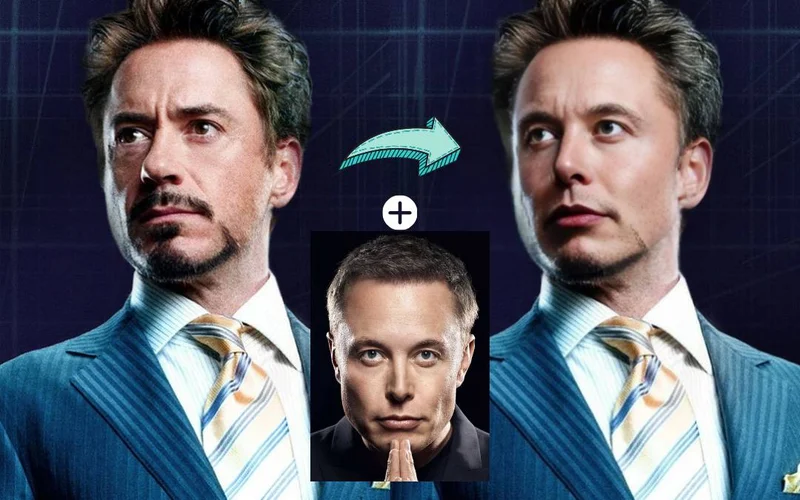
Common queries about Face Swap by Remaker answered
FaceVary is a free online tool that facilitates the swapping of faces in photographs. It offers a user-friendly interface that permits easy head replacement in images.
FaceVary works by allowing users to upload an original image and a target face image. The AI-powered technology in FaceVary will then replace the original face with the target face. Users can then preview the face swap result and if satisfied, download the face swap image.
Yes, FaceVary is free to use.
Real ratings and feedback from the community
Be the first to share your rating and comments for this AI tool!
How Face Swap by Remaker stacks up against top competitors
| Feature | Face Swap by Remaker | DeepSwapper AI | MockoFun Face Swap | FacePlay |
|---|---|---|---|---|
| Rating | ★ 3 | — | ★ 3 | ★ 3 |
| Pricing Model | free | paid | freemium | Paid |
| API Access | No | No | No | No |
| Open Source | No | No | No | No |
| Link | Visit Website | Visit Website |
Explore similar AI tools in this category
No, FaceVary does not place any watermarks or ads on the edited images. It preserves the originality of your content.
Yes, users can use FaceVary to swap faces with animals or inanimate objects.
Yes, FaceVary is mobile-friendly. It supports mobile usage and the interface is optimized for varying screen sizes. Users can easily upload their original and target face images directly from their smartphones.
Yes, FaceVary can be used for group photo corrections wherein face swaps can be performed.
Yes, users can preview and download their edited images with ease on FaceVary.
No, FaceVary does not retain any user-uploaded images or the generated face swap images.
No, FaceVary abstains from collecting any personal user data like location or usage details.
Yes, users can swap their face with friends and celebrities using FaceVary.
Yes, FaceVary's interface is optimized for varying screen sizes to ensure a user-friendly experience.
Yes, FaceVary users can create humorous videos, memes, and collages by using its face-swapping functionality.
Yes, users can upload their original and target face images directly from their smartphones on FaceVary.
The privacy of users is highly secure when using FaceVary as it does not retain user-uploaded images, collect personal data, or track and profile users.
FaceVary can be used to swap faces in photographs for various reasons such as creating amusing videos and memes, collages, or simple exploratory experimentation with one's appearance.
Yes, FaceVary can certainly be used for recreational experimentation, allowing users to explore the results of exchanging their face with others, including friends, celebrities, animals or even inanimate objects.
FaceVary is very user-friendly. It has an intuitive interface that permits easy head replacement in images with just a few taps.
IDK
Yes, FaceVary can be used to correct faces in group photos. This can be achieved by swapping the desired faces in the group photo.
| Visit Website |
| Visit Website |


