

VmakerVideo editing AI Tool
Transform raw footage into professional videos with one click.
Video editingFrom $7/mo0
Transform raw footage into professional videos with one click.
Performance Grade
Based on 4 core benchmarks
Vmaker is a highly competitive solution in the Video editing market, demonstrating strong results across all core performance criteria. With a calculated overall rating of 70%, it stands out particularly in ease of use and intuitive interface design. While it operates on a paid model, its capacity to streamline video editing offers an excellent return on investment for both individual developers and enterprise teams.
Pricing & Model
paid
From $7/mo
Open Source & API
Proprietary
No Public API
Foundational Model
Proprietary Engine
Key Integrations
Web App Only
Teams exploring video editing can use Vmaker for ai video editing.
Teams exploring video editing can use Vmaker for content creation.
Teams exploring video editing can use Vmaker for video transitions.
Teams exploring video editing can use Vmaker for automated editing.
Common queries about Vmaker answered
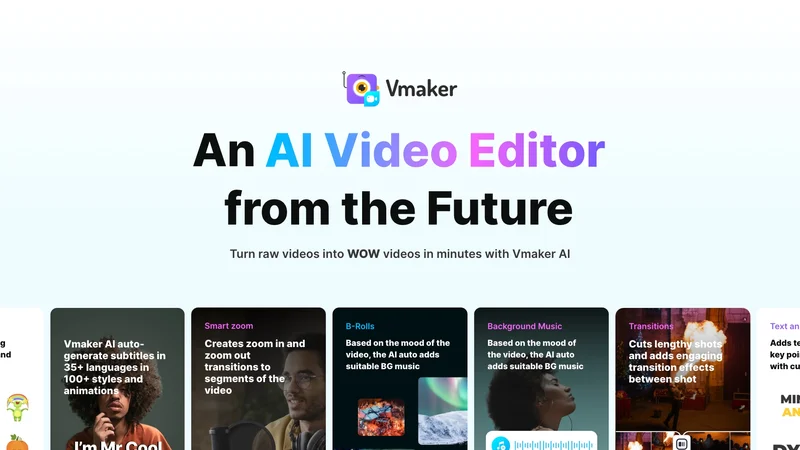
Vmaker AI Video Editor is an artificial intelligence powered tool that offers a broad spectrum of editing functionalities. It aids in converting unprocessed video footage into professional-grade content. The functionalities offered by Vmaker AI include auto-adding videos, images, GIFs, appropriate background music, and stickers based on the script. It is also capable of adding transition effects, generating subtitles in multiple languages and performing zoom-in and zoom-out transitions. It matches the features of the video with suitable text animations and creates intro and outro animations. Long-form videos can be transformed into shorter, trendy ones, suitable for use on Social Media platforms.
Vmaker AI, using AI-driven functions, automatically adds videos, images, and GIFs according to the script provided. It is designed to match the pulse of your video and enhance it with the addition of relevant media elements.
Real ratings and feedback from the community
Be the first to share your rating and comments for this AI tool!
How Vmaker stacks up against top competitors
| Feature | Vmaker | Picsart | Vrew | VideoProc Converter |
|---|---|---|---|---|
| Rating | ★ 3 | ★ 4.0 | ★ 4.0 | ★ 3 |
| Pricing Model | paid | Freemium | freemium | paid |
| API Access | No | No | No | No |
| Open Source | No | No | No | No |
| Link | Visit Website |
Explore similar AI tools in this category
Yes, Vmaker AI is equipped with a functionality to auto-generate subtitles in over 35 languages. This allows your content to reach a wider audience, irrespective of the language they speak.
The AI technology of Vmaker assesses the features of the video and seamlessly pairs them with suitable text animations. This smart pairing is achieved by a deep understanding of the video's content and context to ensure that the text animations added are relevant and enhance the video's overall appeal.
Vmaker AI uses a specific functionality designed to convert long-form videos into short-form videos. The part of the tool that handles conversions automatically truncates longer videos into shorter, trendy, publish-ready pieces suitable for sharing across social media platforms.
Yes, Vmaker AI has the capability to detect high points in a video. This is primarily used to create high-quality teasers that can function either as standalone snippets or as intros to the main video content.
Vmaker AI offers a comprehensive package of editing solutions. This includes timeline editing, audio enhancement, color adjustments, reverse playback, speed adjustment, noise removal, subtitles and translations. Access to a stock library with videos, images, and GIFs is also provided. It is also equipped with the ability to convert lengthy videos into shorts, and generate video highlights.
Vmaker AI has a functional feature that allows users to directly publish their edited videos onto different social media platforms. This seamless integration makes content sharing much easier and efficient.
The 'smart suggestions' feature in Vmaker AI uses its AI technology to provide intelligent tips to help users enhance and refine their videos, helping them achieve a polished and professional output.
The audio enhancement function of Vmaker AI allows users to refine and enhance the audio quality of their video. Tools for adjusting volume levels, managing mono/stereo outputs and adding fade in/out are included.
With Vmaker AI's reverse playback feature, users can add a temporal reversal effect to their video clips. This feature can be applied instantaneously at just a click, bringing viewers a unique time reversal experience.
Vmaker AI has a refined noise removal algorithm that allows users to eliminate background noise and wind noise from their videos, enhancing the clarity of the audio in just a click.
Vmaker AI has an extensive stock library with access to thousands of premium assets. This includes a wide range of videos, images, and GIFs that can be easily incorporated into the users' video projects.
Yes, Vmaker AI can auto-generate intro and outro animations. It is designed to automatically introduce a title for the video. The AI assesses the video content and creates fitting introductions and conclusions to create a professional look and feel.
Vmaker AI is equipped with a function allowing it to auto-add suitable transitions between shots in a video. It assesses the video script and the shots within to determine the best and most seamless transition effects.
Yes, Vmaker AI supports video speed adjustments. The editing toolkit allows users to control the speed of their video, aiding in creating time-lapse or slow-motion effects with ease.
Yes, Vmaker AI can transform raw footage into professional videos with just a single click. The intelligent tool enhances raw videos with the addition of media elements, transition effects, relevant animations, appropriate zoom-ins and zoom-outs and other enhancements.
Vmaker AI uses its advanced AI technology to match the defining features of a video with suitable text animations, thus adding a seamless textual expression to video content. It harnesses the power of AI to understand the context and essence of the video, selecting the appropriate text animations that best suit the nature of the video.
Vmaker AI is designed to generate subtitles for videos. It has the capability to auto-generate subtitles in more than 35 languages in over 100 styles. By using this functionality, users can reach a wider, multi-lingual audience easily.
Vmaker AI has the capacity to include smooth zoom-in and zoom-out transitions in videos. The AI detects the necessary scenes where such transitions will enhance the impact of the video and incorporates them accordingly.
| Visit Website |
| Visit Website |

Fliki
Compare Fliki's free and paid tiers to see how this text-to-video AI tool simplifies social media, blog-to-video, and content marketing production.

Lovablev2.2
Lovablev2.2 turns your app ideas into live web apps instantly with AI and simple prompts-no coding required for fast MVPs and prototypes.

Vireel
Vireel turns raw ideas into viral TikTok, Reels, and Shorts with AI formulas and real-time analytics to boost engagement for creators.

Vsub
Create faceless videos in seconds with AI


